
What Is FuseBase? Your Gateway to AI-Powered Client Collaboration!
Managing clients shouldn’t feel like herding cats through a minefield of scattered emails, endless file searches, and communication chaos. That’s where FuseBase comes in—and honestly, it’s about time someone built something this smart.
FuseBase is an AI-powered client portal and collaboration platform that’s fundamentally changing how agencies, consultants, and service providers work with their clients. Think of it as your central command center where every client interaction, document, project update, and conversation lives in one beautifully organized space. But here’s where it gets exciting—FuseBase isn’t just another project management tool trying to do everything poorly. It’s specifically designed for client-facing businesses that need to look professional, stay organized, and scale without losing their minds.
The real magic happens with FuseBase’s 24/7 AI agent capabilities. Picture this: your clients get instant answers to their questions at 2 AM on a Sunday without you lifting a finger. The AI handles routine inquiries, guides clients through your processes, and keeps communication flowing even when you’re sleeping, vacationing, or focusing on billable work. It’s like having a tireless assistant who never needs coffee breaks or vacation days.
Here’s something you’ll love—full white-label customization! Your agency’s branding, your domain, your look and feel. Clients see YOUR brand, not some third-party platform logo. For consultants and agencies building serious businesses, this matters more than you might think. It screams professionalism and keeps your brand front and center.
Now, let’s talk about what makes this opportunity absolutely wild. FuseBase is available through a lifetime deal that turns the traditional SaaS pricing model completely upside down. Instead of paying monthly fees that drain your budget year after year, you can grab lifetime access through platforms like AppSumo. Speaking of which, if you’re new to lifetime deals and wondering how AppSumo works, check out this complete guide—it’ll blow your mind what you’ve been missing!
Whether you’re managing five clients or fifty, FuseBase transforms those scattered client relationships into streamlined, professional experiences. No more digging through email threads. No more “Did you get my file?” conversations. No more clients feeling lost or confused about project status. Everything lives in one gorgeous, AI-enhanced portal that makes you look like you’ve got your act together (even on those days when you absolutely don’t).
Ready to see how FuseBase can revolutionize your client management and save you countless hours? Let’s break down exactly what makes this platform worth your attention!
FuseBase Core Features: Everything You Get in This Powerhouse Platform!
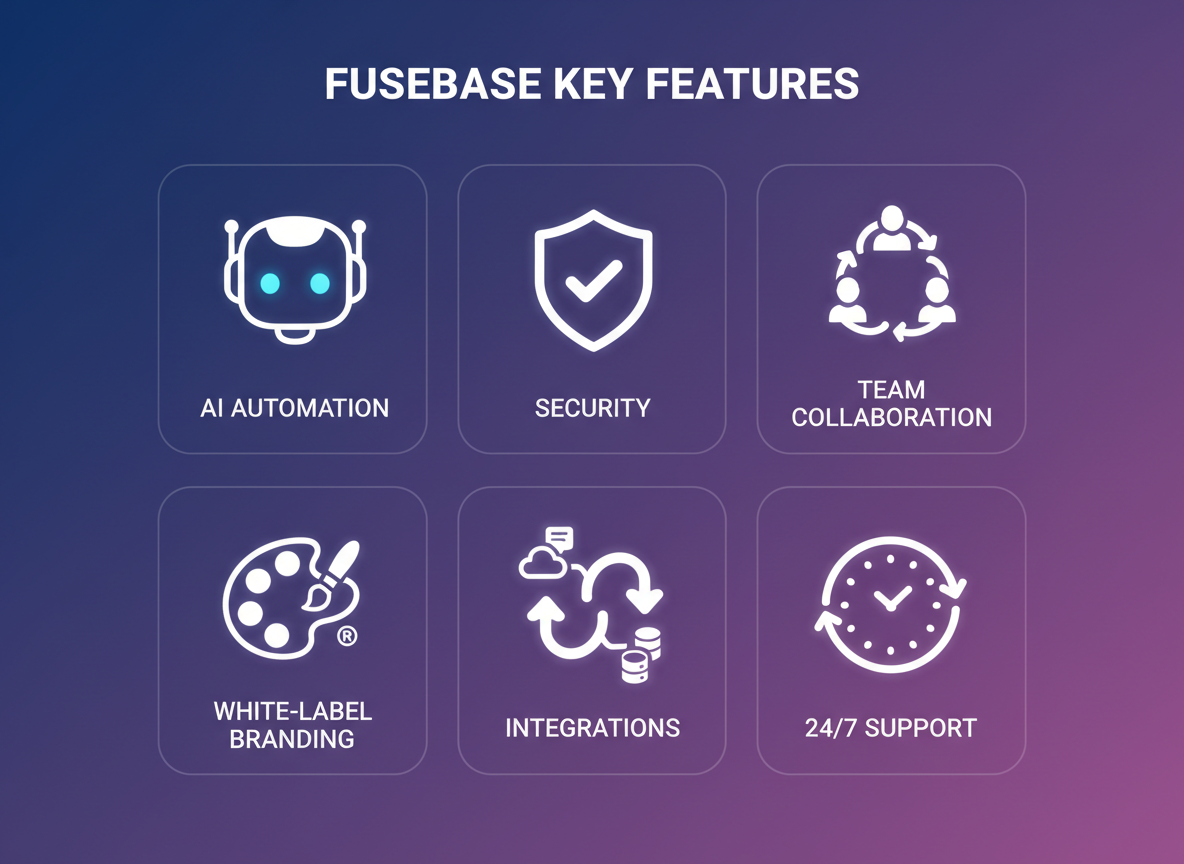
Let’s talk about what makes FuseBase such a phenomenal tool for your business!
AI-Powered Workspace Automation That Actually Works
FuseBase doesn’t just slap “AI” on the label and call it a day. The platform’s intelligent automation handles repetitive client communications, schedules follow-ups, and even drafts responses based on your previous interactions. You’ll spend less time typing the same emails and more time closing deals.
The 24/7 AI agent is where things get really exciting! It answers client questions while you sleep, manages workflow triggers, and keeps projects moving forward without constant manual intervention. Think of it as having a tireless assistant who never asks for a coffee break.
White-Labeled Client Portals That Scream Professional
Your brand matters, and FuseBase gets that. Create fully customized client portals with your logo, colors, and domain. Clients see your business, not someone else’s platform. It’s the polish that separates $100 freelancers from $10,000 agencies.
Collaboration Tools That Keep Everyone on the Same Page
Real-time document editing means you and your clients can work together seamlessly. No more version control nightmares or “final_draft_v8_REALLY_FINAL.docx” situations. Feedback loops happen right where the work lives, and document sharing is secure and straightforward.
Similar to how Dive Meeting transforms team productivity through better collaboration, FuseBase creates that same magic for client-facing work.
Enterprise-Level Security Without the Enterprise Price Tag
Your files and client data stay protected with robust encryption and secure storage. You’ll sleep better knowing sensitive information isn’t floating around unprotected.
Integrations That Connect Your Tech Stack
FuseBase plays nice with your existing tools. Whether you’re using project management software, CRM systems, or communication platforms, the integration capabilities mean you won’t have to rebuild your entire workflow from scratch.
FuseBase Pricing & AppSumo Lifetime Deal: Unbelievable Value Alert!
Here’s where things get really exciting! FuseBase is available through AppSumo with a lifetime deal that’ll make your wallet do a happy dance. We’re talking about a one-time payment instead of those never-ending monthly subscriptions that drain your budget year after year.
Let’s break down what you’re getting:
Tier 1 ($79 one-time) includes 1 workspace, 5 team members, 10 clients, 50GB storage, unlimited pages, and custom branding. Perfect for solopreneurs just getting started with client portals.
Tier 2 ($158 one-time) bumps you up to 3 workspaces, 10 team members, 50 clients, and 250GB storage. This tier makes sense if you’re managing multiple client projects or running a small agency.
Tier 3 ($237 one-time) gives you 5 workspaces, 20 team members, 150 clients, and 500GB storage. Now you’re talking serious business scalability!
Tier 4 ($395 one-time) unleashes 10 workspaces, 50 team members, 500 clients, and a whopping 1TB of storage. This is your agency-level powerhouse.
Here’s the math that matters: traditional SaaS tools with similar features typically run $49-$99 per month. That means you’d spend $588-$1,188 annually. Over three years? You’re looking at $1,764-$3,564! With FuseBase’s lifetime deal, you pay once and you’re done. That’s thousands of dollars saved.
Even better? AppSumo backs this with their standard 60-day money-back guarantee. You’ve got two full months to test FuseBase with real clients and projects. If it doesn’t revolutionize your workflow, get your money back—no questions asked.
The catch? These lifetime deals don’t stick around forever. AppSumo partnerships are limited-time opportunities, and once they’re gone, you’re looking at standard subscription pricing. Companies often pull these deals when they hit a certain number of users or when their growth goals shift.
Every tier includes all the core features: the AI-powered capabilities, white-label options, client portals, project management tools, and integrations. You’re not getting a watered-down version—this is the full platform.
Stack up to 4 codes if you need more capacity, and you’ll still spend less than one year of traditional subscription software. Plus, all future updates are included. No surprise charges, no tier upgrades needed, no recurring billing stress.
Want to explore more amazing lifetime deals that can transform your business? Check out AppSumo Careers: Your Ultimate Guide to Landing Your Dream Job in 2026! to discover how working with deal platforms can open doors you never imagined.
The value here is absolutely staggering. You’re getting enterprise-level client collaboration tools for less than most people spend on their streaming subscriptions in a year. That’s the power of AppSumo’s lifetime deal model, and it’s exactly why savvy entrepreneurs jump on these opportunities the moment they appear.
Who Should Use FuseBase? Perfect Use Cases for Maximum ROI!
FuseBase isn’t just another collaboration tool—it’s a game-changing solution for specific professionals who need to deliver exceptional client experiences without drowning in administrative chaos!
Marketing agencies managing multiple client accounts find FuseBase particularly transformative. Instead of juggling endless email threads and scattered Google Docs, you’ll create dedicated client portals where campaigns, reports, and approvals live in one organized space. Your team stays focused (much like how Centered App helps boost productivity), while clients get a professional hub that makes your agency look polished and established.
Consultants and coaches love FuseBase for its ability to create that premium experience clients expect. Share resources, track progress, and collect feedback—all within a branded portal that screams professionalism. No more “Did you get my email?” conversations!
Solopreneurs and freelancers can finally punch above their weight. You’ll appear as organized as a full-service agency, even if you’re working from your kitchen table. Onboard clients smoothly, deliver projects efficiently, and get paid faster with everything centralized.
Small business owners use FuseBase to automate repetitive workflows that eat up valuable hours. Client onboarding forms, project templates, approval processes—set them up once, use them forever.
Digital marketing teams coordinating campaigns across designers, copywriters, and strategists find FuseBase eliminates the confusion of “which version is final?” Everyone works from the same source of truth, comments happen in context, and projects move forward without constant status meetings.
The real magic happens when you stop managing tools and start delivering results. That’s where FuseBase earns its keep!
FuseBase vs. Competitors: How It Stacks Up Against Notion, Basecamp & More!
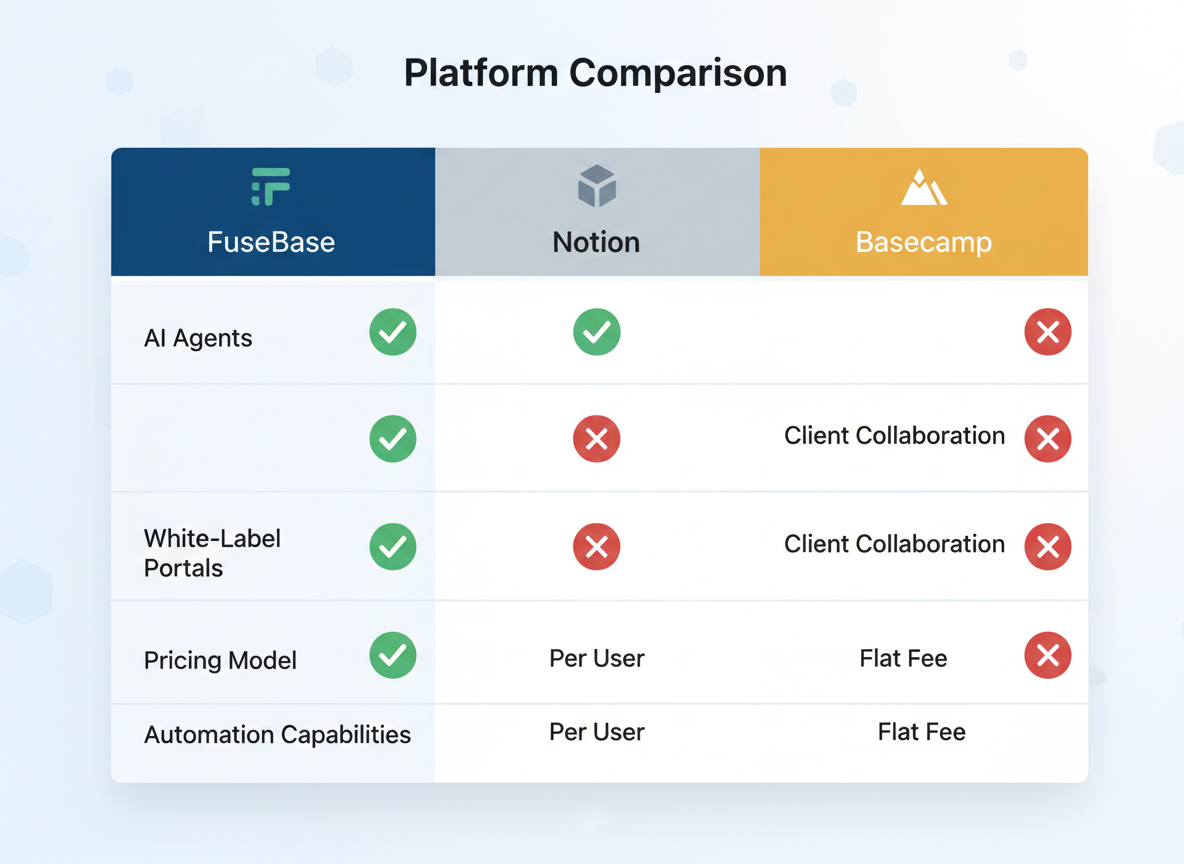
Let’s get real for a second. You’ve probably tested at least three different tools trying to find the perfect client collaboration platform. Notion’s great for internal documentation but feels clunky when clients get involved. Basecamp works for project management but lacks the polish and customization your clients deserve.
Here’s where FuseBase changes everything!
The Knowledge Management Battle: FuseBase vs. Notion
Notion built its reputation as a powerful internal wiki. It’s flexible, sure, but hand it to a client and watch the confusion unfold. The learning curve’s steep, and let’s be honest—most clients won’t spend twenty minutes figuring out your workspace structure.
FuseBase flips this script completely. It’s built specifically for client-facing interactions from day one. Your clients get a clean, intuitive interface that doesn’t require a tutorial. Plus, FuseBase’s AI agent actively helps organize content and suggests relevant information during conversations. Notion? You’re manually linking everything yourself.
The white-label capabilities seal the deal. Your agency’s branding throughout the entire portal—no “Powered by Notion” footer undermining your professional image. That’s worth its weight in gold when you’re trying to command premium prices!
Project Management Showdown: FuseBase vs. Basecamp
Basecamp pioneered simple project management decades ago, but it’s showing its age. It handles tasks and discussions adequately but falls short on document collaboration and knowledge retention.
FuseBase combines Basecamp’s project tracking strength with document management that actually makes sense. Need to reference that strategy doc from three months ago during a current project discussion? The AI agent surfaces it automatically. Basecamp would require you to remember which project folder and message board you buried it in.
Here’s the kicker: FuseBase integrates video recording, screen sharing, and async communication natively. Basecamp forces you to cobble together third-party tools. If you’ve ever dealt with link management across multiple platforms (similar to how Switchy handles link organization), you’ll appreciate FuseBase’s all-in-one approach!
The AI Advantage Nobody Else Has
This is where FuseBase absolutely crushes the competition. While other platforms are bolting AI features onto existing frameworks, FuseBase built its AI agent into the core architecture.
The AI doesn’t just summarize meetings or generate generic responses. It learns your client relationships, understands project context, and proactively suggests content. Imagine having an assistant who’s read every document, attended every meeting, and can instantly pull up exactly what your client needs. That’s what you’re getting!
Traditional tools? They’re still making you search manually through folders and tags. FuseBase’s AI eliminates that busywork entirely.
White-Label Client Portals: The Game’s Changed
Most collaboration tools treat client access as an afterthought. You get a generic login page with someone else’s branding plastered everywhere. Not exactly confidence-inspiring when you’re charging premium consulting fees!
FuseBase lets you customize everything. Your logo, your colors, your domain name. Clients see YOUR brand, not some third-party software company. This positions you as the established professional you are, not just someone renting workspace on another platform.
The psychological impact’s huge. Clients perceive higher value when everything feels purpose-built for them. And you? You maintain control over the entire client experience from login to logout.
The Pricing Reality Check
Let’s talk money, because that’s what matters when you’re running a lean operation!
Notion Team plan runs $15 per user monthly. Load up a team of five, you’re dropping $75 monthly or $900 annually. Basecamp? Flat $299 monthly regardless of users, which sounds great until you realize it lacks half the features you actually need for client work.
FuseBase typically offers AppSumo lifetime deals in the $99-$299 range depending on tier limits. That’s right—pay once, use forever. Even at regular pricing, FuseBase delivers more client-specific functionality at comparable or lower monthly costs than either alternative.
Run the math on a three-year window. Traditional tools cost you $2,700+ (Notion) or $10,764 (Basecamp). FuseBase lifetime deal? Under $300 total. The ROI’s so obvious it practically screams at you!
Where FuseBase Truly Shines
If you’re managing internal teams only, Notion or Basecamp might suffice. But the moment you’re dealing with clients—agencies, consultants, freelancers, service providers—FuseBase dominates.
The combination of white-label branding, AI-powered assistance, comprehensive document management, and client-friendly interface creates something genuinely different. You’re not forcing clients to adapt to your tools anymore. You’re providing them with an experience that feels custom-built.
Plus, the all-in-one nature eliminates subscription sprawl. No more paying separately for video tools, document storage, project management, and client portals. FuseBase consolidates everything under one affordable roof.
The other platforms excel at specific things. FuseBase excels at the thing that actually matters: making client collaboration effortless while making you look incredibly professional!
Getting Started with FuseBase: Your Quick Setup Guide to Success!
Ready to transform how you work with clients? Let’s get your FuseBase account up and running in minutes!
Creating Your Account and Initial Setup
Head over to the FuseBase website and sign up with your business email. The onboarding wizard walks you through the basics, but here’s what matters most: choose your workspace name carefully (you can change it later, but starting right saves time). Within two minutes, you’ll land on your dashboard.
First things first—connect your domain if you’re planning white-labeled portals. This step makes your client portals look completely professional, with your branding front and center instead of FuseBase’s.
Configuring Your First White-Labeled Client Portal
Click “Create New Portal” and you’ll see a template gallery. Start with the Client Onboarding template for your first project. Add your logo in the top-left corner, customize the color scheme to match your brand palette, and replace the default welcome message with something personal.
Here’s a pro tip: create a master template first. Set up your standard sections (Project Overview, Files, Communication Hub, Resources) and save it. Every new client portal you create afterward takes just seconds to launch!
Setting Up AI Agents for Automated Workflows
Navigate to the Automation tab and select “Create AI Agent.” You’ll want to start with three basic agents:
1. FAQ Responder – Feed it your common client questions and responses. This agent handles 70% of repetitive inquiries automatically.
2. Document Organizer – Set rules for how uploaded files get categorized. Client sends an invoice? It goes straight to the Billing folder.
3. Task Reminder Bot – Configure it to nudge clients about pending approvals or missing information.
Each agent includes a simple visual builder. You’re not coding anything—just connecting trigger events to actions. Think of it like creating a flowchart that actually works!
Inviting Team Members and Clients
Under Settings, you’ll find “Team Management.” Add team members by email and assign roles: Admin, Editor, or Viewer. Admins see everything; Editors can modify content but not settings; Viewers get read-only access.
For clients, click “Invite Client” from within any portal. They’ll receive a branded email with login instructions. No FuseBase account required on their end—they just click and access their portal. That’s it!
Set permissions carefully. You might want clients to upload files but not delete them, or comment on tasks without reassigning them.
Customization Tips for Branding and Personalization
Beyond logos and colors, dig into the advanced customization settings:
- Custom domain: portal.yourcompany.com beats randomstring.fusebase.com every time
- Email templates: Modify notification emails with your tone and signature
- Welcome videos: Record a quick Loom walkthrough and embed it on each client’s dashboard
- Custom fields: Add fields specific to your industry (project type, contract value, renewal date)
Your clients shouldn’t feel like they’re using generic software. Make it unmistakably yours!
First Automation Workflow Examples to Implement Immediately
Let’s get practical with three workflows that’ll save you hours this week:
Workflow 1: New Client Onboarding
- Trigger: New portal created
- Actions: Send welcome email → Create standard folder structure → Assign onboarding checklist → Schedule kick-off meeting reminder
Workflow 2: Document Approval Process
- Trigger: File uploaded to “Review Needed” folder
- Actions: Notify assigned reviewer → Set 48-hour reminder → Move to “Approved” folder when marked complete → Alert client
Workflow 3: Payment Reminder Sequence
- Trigger: Invoice due date approaching
- Actions: Send friendly reminder 7 days before → Follow-up reminder 1 day before → Alert you if payment not received within 3 days
Each workflow takes about five minutes to configure. The time you’ll save? Countless hours every month.
Speaking of time-saving tools, if you’re creating client presentations or proposals, check out DrLambda: AI-Powered Presentation & Content Creation Tool—it pairs beautifully with FuseBase for a complete client management system!
Testing Before You Launch
Before inviting your first real client, create a test portal and invite yourself using a personal email. Click through everything from the client’s perspective. Upload a file, leave a comment, submit a form. You’ll spot quirks you’d never notice from the admin side.
Run through your automated workflows with test data. Better to catch a glitch now than after sending it to a paying client!
Your 15-Minute FuseBase Launch Checklist
- [ ] Account created and profile completed
- [ ] Logo and brand colors added
- [ ] First portal template built
- [ ] Three AI agents configured
- [ ] Team members invited
- [ ] One automation workflow activated
- [ ] Test portal reviewed from client view
That’s genuinely all you need to start. FuseBase grows with you—you’ll discover features over time that solve problems you didn’t know you had. But right now, you’ve got enough firepower to impress clients and streamline your workflow dramatically.
The beauty of FuseBase? You’re not locked into using every feature immediately. Start simple, add complexity as needed, and watch your client relationships transform from scattered emails and missed messages to smooth, professional collaboration!
Why FuseBase Is a Total Winner for Budget-Conscious Marketers!
Let’s be real – you’ve been searching for a solution that doesn’t drain your marketing budget while actually delivering results. FuseBase checks every single box, and then some!
Think about what you’re getting here: a client portal that makes you look incredibly professional, collaboration tools that keep projects moving smoothly, and AI-powered automation that handles the tedious stuff so you don’t have to. This isn’t just another software purchase – it’s an investment that pays for itself by saving you hours each week.
The time-saving element alone is massive. Instead of juggling emails, chasing down feedback, and manually organizing client files, FuseBase’s AI handles the heavy lifting. You’re free to focus on strategy, creativity, and actually growing your business. And if you’re already using AI tools to streamline your workflow (like Merlin AI for accessing multiple AI models), adding FuseBase creates a powerhouse efficiency stack.
Here’s the thing you can’t ignore: the AppSumo lifetime deal won’t last forever. These limited-time offers disappear quickly, and once they’re gone, you’ll be stuck paying monthly subscription fees that add up fast. We’re talking about potentially thousands of dollars saved over the lifetime of using this tool.
Your clients expect professional communication and seamless collaboration. FuseBase delivers that polished experience without the enterprise-level price tag. You’ll eliminate the back-and-forth confusion, reduce project delays, and create an experience that makes clients want to work with you again and again.
The numbers speak for themselves. For a fraction of what competing platforms charge annually, you’re getting lifetime access to a tool that positions your business as organized, efficient, and cutting-edge.
Don’t let analysis paralysis cost you this opportunity! Head over to 5 Dollar Friday right now and grab your FuseBase lifetime deal before it vanishes. Your future self (and your bank account) will thank you for making the smart move today!
Frequently Asked Questions About FuseBase
What is FuseBase and how does it work?
FuseBase is a client portal and collaboration platform that combines project management, document sharing, and AI-powered automation in one place. It works by creating dedicated workspaces where you and your clients can communicate, share files, manage tasks, and track project progress. The platform uses AI agents to automate repetitive tasks like follow-ups, document summarization, and workflow management. You’ll get branded client portals that make you look incredibly professional while keeping everything organized behind the scenes.
Is FuseBase really available as a lifetime deal?
Yes! Right now, FuseBase is offering lifetime access through AppSumo, which means you pay once and own it forever. No monthly subscriptions eating into your budget year after year. This deal won’t last forever though—lifetime deals typically disappear once the promotion ends, so you’ll want to grab it while it’s available.
Can I white-label FuseBase for my clients?
Absolutely! FuseBase lets you fully white-label the platform with your own branding, logo, colors, and custom domain. Your clients will see your brand throughout their entire experience, making it look like you’ve built a custom client portal just for them. It’s perfect for agencies and consultants who want to maintain a consistent brand identity.
How do the AI agents work in FuseBase?
The AI agents in FuseBase handle repetitive tasks automatically. They can send follow-up messages, summarize long documents, generate meeting notes, create task lists from conversations, and even respond to common client questions. You set up the rules and parameters, and the AI takes care of the execution. It’s like having a virtual assistant who never sleeps or takes vacation days.
What integrations does FuseBase support?
FuseBase integrates with popular tools you’re probably already using, including Google Drive, Dropbox, Slack, Zoom, and various CRM systems. These integrations let you connect your existing workflow without starting from scratch. You can pull in files from cloud storage, sync calendar appointments, and keep everything flowing smoothly between platforms.
Is FuseBase secure for sensitive client information?
Security is built into FuseBase’s foundation. The platform uses bank-level encryption to protect your data, offers customizable permission levels so you control who sees what, and includes features like password protection and two-factor authentication. You can safely share contracts, financial documents, and confidential project files without worrying about unauthorized access.
Can I migrate from other tools like Notion or Basecamp?
Yes, you can transition from other project management tools to FuseBase. While there’s no automatic one-click migration (that’d be nice!), you can import documents, recreate your project structures, and invite your team and clients to the new platform. Many users find the switch worth it because FuseBase is specifically designed for client-facing work, unlike general project management tools. The learning curve is manageable, and the improved client experience makes the transition effort pay off quickly.
What’s included in the AppSumo lifetime deal tiers?
The AppSumo lifetime deal offers multiple tiers with increasing features. Lower tiers typically include basic portal functionality with limited clients and storage, while higher tiers unlock more client accounts, increased storage, additional AI agent capabilities, and advanced white-labeling options. Each tier offers lifetime access with all future updates included. You can start with a lower tier and stack additional codes to upgrade if your needs grow. The exact features vary by tier, so check the current AppSumo listing for specific details on what each level includes.
Looking for more ways to streamline your marketing workflow? Check out DeepWord: Revolutionary AI Video Creation Tool That’s Transforming Marketing in 2026! to see how AI-powered video creation can complement your client collaboration strategy!
Ready to transform how you work with clients? Grab your FuseBase lifetime deal through 5 Dollar Friday before this opportunity disappears!
Leave a Reply