
What Is Dive Meeting? Your Complete Introduction to Smarter Team Collaboration!
Dive Meeting is a collaborative platform that’s completely rethinking how modern teams handle their most valuable (and often wasted) resource: meeting time. If you’ve ever sat through another rambling, agenda-free meeting wondering where the last hour went, you’ll get why this matters.
Here’s what Dive actually does: it gives your team structured agendas, real-time collaboration tools, and clear action items that don’t disappear into the void. No more “wait, what did we decide last week?” moments. It’s built for teams tired of talking without doing—and especially valuable for budget-conscious marketers and entrepreneurs who can’t afford to waste time.
Think of it as your meeting’s backbone. While tools like Centered App handle focus and productivity during solo work, Dive tackles the collaboration chaos that drains your calendar. This is your official guide to understanding how it transforms team productivity!
How Dive Meeting Works: Key Features That Save Time and Boost Engagement!
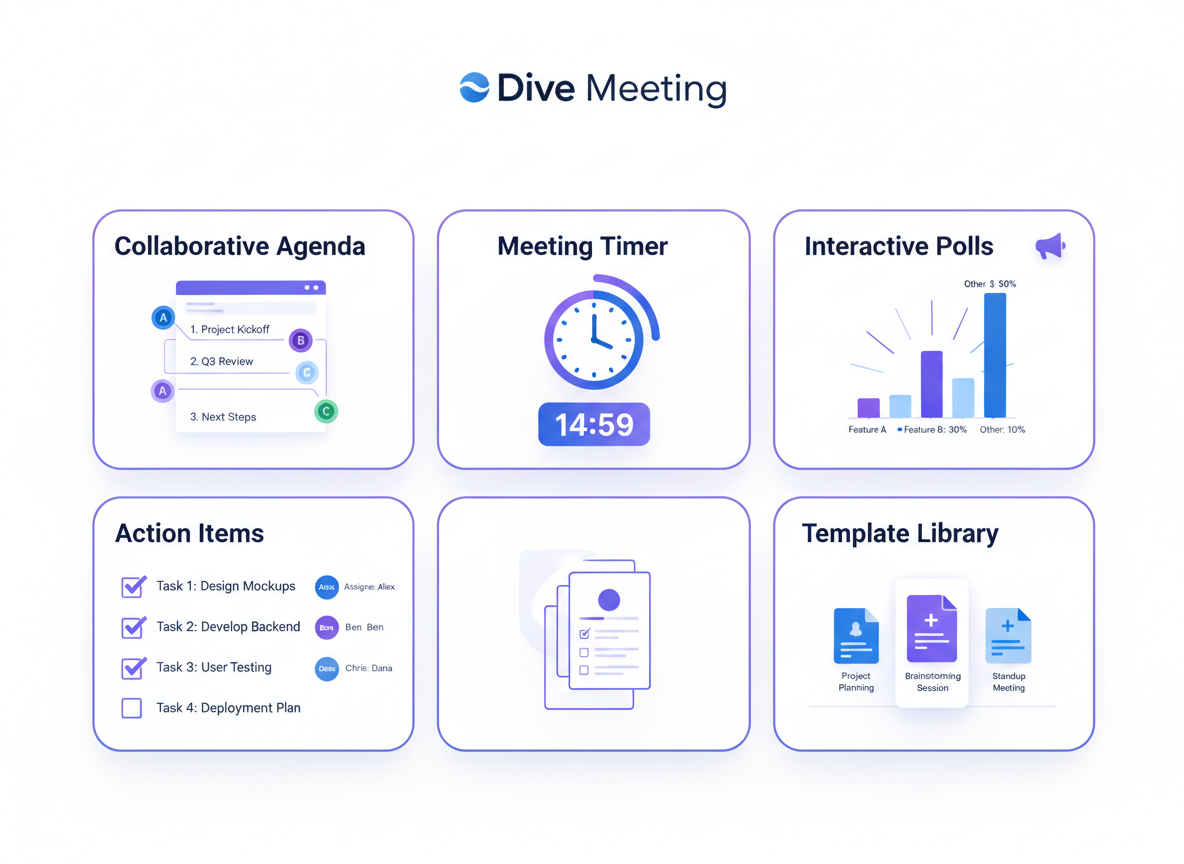
Dive meeting operates through a streamlined platform that brings every meeting element under one roof. You’ll start with collaborative agenda creation where team members contribute talking points in real time before the meeting even starts. No more scattered email threads or last-minute scrambling!
Built-in timers keep discussions focused. You can allocate specific minutes to each agenda item, and the platform gently nudges you when time’s running short. This prevents those marathon meetings that drain everyone’s energy.
The interactive tools really shine during actual meetings. Launch quick polls to gather instant feedback, open the whiteboard for visual brainstorming, or use voting features for democratic decision-making. These aren’t just add-ons—they’re engagement engines.
Action items get automatically captured and assigned with clear deadlines. Team members receive notifications, eliminating the “I thought someone else was handling that” confusion. Think of it as accountability on autopilot, similar to how Merlin AI simplifies complex workflows through intelligent automation.
Pre-built templates for standups, retrospectives, and planning sessions mean you’re never starting from scratch. After the meeting wraps, everyone gets a summary with action items highlighted and next steps clarified.
Dive Meeting Integrations: Seamlessly Connect With Your Existing Tools!
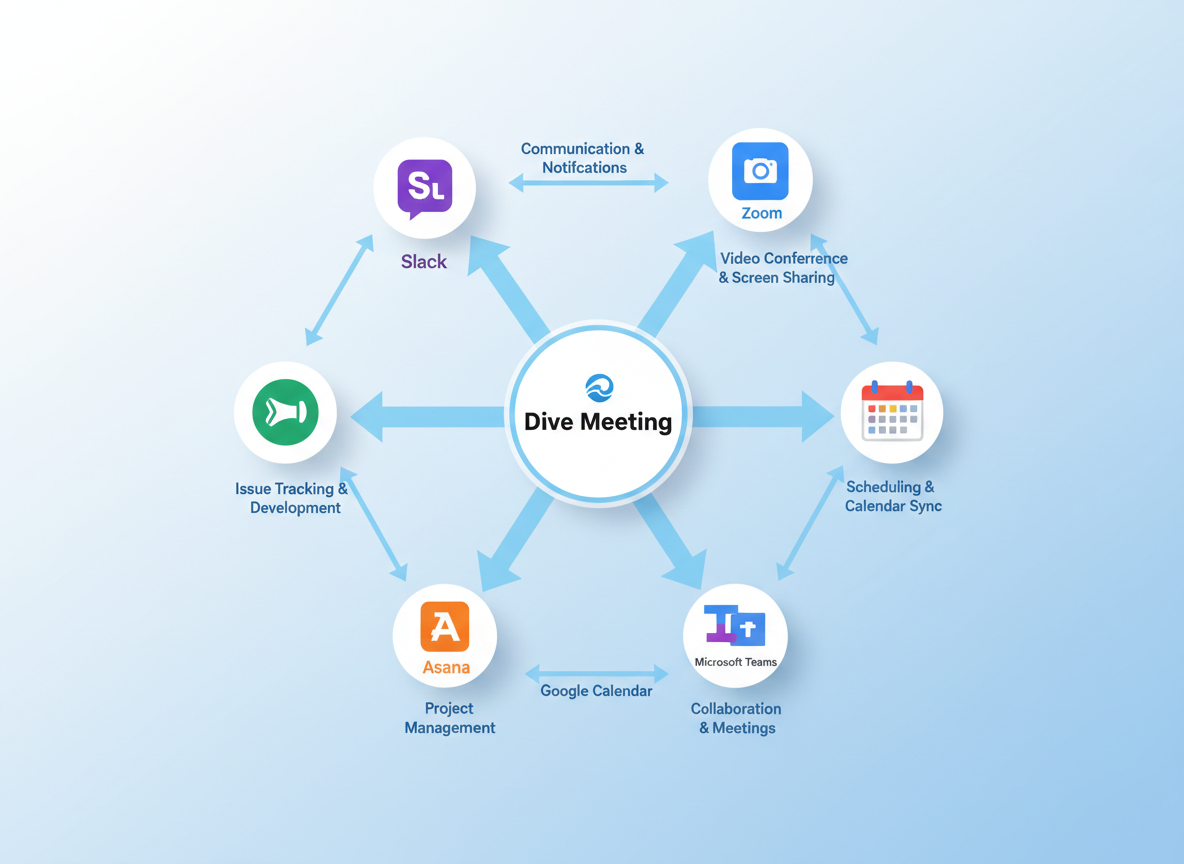
Here’s where Dive Meeting really shines – it plays nice with everything you’re already using! Connect it directly with Zoom, Google Meet, or Microsoft Teams, and your video links automatically populate in meeting agendas. Calendar sync with Google Calendar and Outlook means you’ll never manually create another meeting entry. Action items flow straight into Slack, Asana, or Jira without copy-pasting, and your team stays coordinated through integrated communication platforms.
Setup takes about five minutes (seriously!), and the automation handles what used to eat up hours of your week. For solopreneurs juggling multiple clients or small teams wearing too many hats, this integration magic means you’re managing meetings instead of being managed by them. Stop switching between twelve browser tabs! And if you’re hunting for more productivity tools that won’t drain your budget, check out What Is AppSumo? Your Complete Guide to Lifetime Software Deals in 2026! for game-changing savings on software essentials.
Who Should Use Dive Meeting? Perfect For Entrepreneurs and Marketing Teams!
Dive meeting works brilliantly for remote teams and distributed organizations that need structure without the hassle. Small business owners and solopreneurs will love how it streamlines client meetings, while digital marketing agencies can coordinate campaign reviews effortlessly. Social media managers conducting content planning sessions will appreciate the organized approach. It’s especially valuable for marketing teams on tight budgets seeking serious productivity gains—just like using TruConversion’s powerful analytics to optimize performance. The platform scales beautifully whether you’re a solo operator or managing a growing team, making it incredibly flexible for businesses at any stage!
Dive Meeting Pricing and Plans: What You Need to Know in 2026!
While Dive Meeting’s exact pricing structure varies based on team size and features, you’ll find plans designed for teams at every stage. Most meeting management tools charge per user monthly, but smart buyers know there’s a better way! Check platforms like Appizmo for potential lifetime deals that eliminate recurring subscriptions. Think about this: if your team wastes just 30 minutes per week on unproductive meetings, that’s 26 hours annually per person. At typical salary rates, the ROI becomes obvious fast! Higher-tier plans typically include advanced analytics, integrations, and priority support. Budget-conscious teams often start with basic tiers and upgrade as they grow. The real value isn’t the monthly cost—it’s reclaiming hours your team can spend on revenue-generating activities instead!
Frequently Asked Questions About Dive Meeting
Is Dive Meeting free? What are the pricing options?
Dive offers a freemium model with solid basic features. Paid plans start around $8-12 per user monthly, with annual discounts available. Enterprise pricing is custom-quoted based on team size and needs.
How does Dive compare to other tools for meeting management?
Dive specializes purely in meeting workflows, while broader tools try to do everything. It’s more focused and intuitive for meeting-specific tasks. If you need comprehensive content creation alongside meeting management, DrLambda offers AI-powered presentation features that complement meeting prep beautifully.
Does Dive Meeting have a mobile app?
Yes! Both iOS and Android apps are available, letting you manage meetings on the go.
What security features does Dive offer? Is it GDPR compliant?
Dive uses enterprise-grade encryption, SSO support, and maintains GDPR and SOC 2 compliance. Your meeting data stays secure.
Can I use Dive for large team meetings or just small groups?
It works for both! Teams from 5 to 500+ use Dive successfully. The interface scales without getting cluttered.
How long does it take to set up and onboard my team?
Most teams are up and running in under an hour. The learning curve is gentle, and templates speed things up considerably.
Does Dive offer meeting recording or transcription features?
Some plans include basic transcription through integrations. Native recording depends on your subscription tier.
Can Dive integrate with my existing project management tools?
Absolutely! Dive connects with Slack, Microsoft Teams, Asana, Jira, Trello, and dozens more through Zapier.
What kind of meeting templates are available?
You’ll find templates for standups, retrospectives, one-on-ones, strategy sessions, client meetings, and more. Custom templates are easy to create too.
How much time can my team realistically save using Dive?
Most teams report saving 3-5 hours weekly per person. That’s fewer meetings, shorter meetings, and way less follow-up confusion!
Leave a Reply