Author: Avindh Ramrekersingh

  • Stacks Reviews 2026: Real User Feedback, Features & Is This Bookmark Manager Worth It?

    Stacks Reviews 2026: Real User Feedback, Features & Is This Bookmark Manager Worth It?

    What Is Stacks and Why Are Digital Marketers Buzzing About It?

    If you’re drowning in browser tabs and can’t find that perfect resource you bookmarked three weeks ago, you’re not alone. Stacks has emerged as an AI-powered bookmark manager that’s catching serious attention in 2026, especially among digital marketers juggling hundreds of links daily. Think of it as your research assistant that actually remembers where you put things!

    We’ve spent weeks testing Stacks alongside real user feedback from entrepreneurs, content creators, and marketing pros who live and breathe digital resources. Just like we did with our Merlin AI Review, we’re cutting through the marketing hype to show you what actually works and what falls short.

    Here’s the deal: This review will walk you through Stacks’ standout features, reveal the frustrations users are reporting, and help you decide if it’s worth your hard-earned money. Spoiler alert—there are some impressive wins here, but also a few gotchas you need to know about before clicking that buy button!

    What Real Users Are Saying: Stacks Reviews Breakdown

    What Real Users Are Saying: Stacks Reviews Breakdown

    Across major platforms, Stacks maintains solid ratings—4.3 stars on the Chrome Web Store and 4.2 on Product Hunt. Users consistently rave about the AI-powered search that actually finds buried bookmarks in seconds, plus the visual workspace that beats traditional folder chaos. Time savings? That’s the biggest win people mention!

    The complaints pop up too, though. Several users struggled with importing bookmarks from other managers (one called it “more manual than expected”), and there’s definitely a learning curve if you’re coming from basic browser bookmarks. Researchers love the deep organization features, while marketers appreciate quick access to campaign resources—though some wish for more team collaboration tools. Similar to what you’ll find in our Switchy review, different user types have different needs.

    Overall satisfaction? Pretty strong, especially once people push past that initial setup phase.

    Key Features That Make Stacks Stand Out (Or Fall Short)

    Key Features That Make Stacks Stand Out (Or Fall Short)

    Stacks brings AI-powered search to your bookmarks, letting you find saved content using natural language instead of hunting through folders. The visual card-based interface displays your bookmarks with thumbnails and descriptions, making it easier to scan than traditional lists.

    The Chrome extension works smoothly, though Firefox users might feel left out. Cross-device syncing keeps your bookmarks accessible everywhere, but the mobile app experience can be clunky compared to desktop.

    Import tools handle migrations from Chrome, Pocket, and other managers without much fuss. However, collaboration features are pretty limited—you can’t easily share collections with team members like you might with tools such as Aimfox for LinkedIn automation.

    What shines? The visual organization and AI search genuinely save time. What falls short? Browser support and team functionality could use serious work.

    How Stacks Compares to Top Bookmark Manager Alternatives

    How Stacks Compares to Top Bookmark Manager Alternatives

    Let’s cut through the noise and see how Stacks actually stacks up!

    Quick Comparison Matrix:

    | Feature | Stacks | Raindrop.io | Pocket | Browser Bookmarks |
    |———|——–|————-|——–|——————-|
    | Visual Boards | ✓ | Limited | ✗ | ✗ |
    | Team Collaboration | ✓ | ✓ | ✗ | ✗ |
    | AI-Powered Search | ✓ | ✓ | ✗ | ✗ |
    | Pricing (Annual) | $8-12/mo | $3-10/mo | Free-$5/mo | Free |
    | Offline Access | ✓ | ✓ | ✓ | ✓ |

    Price vs. Value Reality Check:

    Stacks sits in the mid-range pricing tier. You’re looking at around $96-144 annually for premium features. Raindrop.io undercuts it at $36/year for pro features, while Pocket’s premium runs $44.99/year. Your browser’s built-in bookmarks? Completely free.

    Here’s what matters: are you paying for features you’ll actually use?

    Where Stacks Wins:

    Stacks shines with its visual-first approach. If you’re tired of endless bookmark folders, its board-style organization feels refreshingly modern. The collaboration features work smoothly for teams managing shared research or content calendars. Digital marketers love the ability to share curated resource collections with clients or team members without messy email threads.

    The workspace organization actually makes sense for project-based work. You can separate client projects, content research, and competitor analysis into distinct spaces.

    Where Competitors Excel:

    Raindrop.io offers better value if you’re budget-conscious. Its tagging system feels more flexible, and the permanent library feature ensures nothing disappears. Pocket dominates for read-it-later functionality with its clean reading view and mobile experience.

    Browser bookmarks? They’re still unbeatable for speed and simplicity when you don’t need fancy features.

    Best Use Cases for Choosing Stacks:

    You should seriously consider Stacks if you’re:

    • Managing multiple client projects with content research needs
    • Building resource libraries your team actually needs to access
    • Organizing visual content (screenshots, inspiration boards, design references)
    • Collaborating on shared research with remote team members

    It’s worth the investment when organization directly impacts your productivity. Similar to how Sterling Stock Picker helps investors organize financial research, Stacks helps marketers organize digital resources.

    When to Skip Stacks:

    Don’t bother if you’re flying solo with basic bookmarking needs. Browser bookmarks handle that just fine. Also skip it if budget’s tight—there are cheaper alternatives that’ll get you 80% of the functionality.

    For entrepreneurs and marketers deciding where to invest their time and money, Stacks makes sense when visual organization and team collaboration actually solve real workflow problems you’re facing today.

    The Verdict: Should Digital Marketers Invest in Stacks?

    Stacks shines for content curators, researchers, and marketers juggling multiple campaigns who think visually. If you’re constantly drowning in browser tabs and need quick access to categorized resources, it’ll transform your workflow!

    However, if you’re on a shoestring budget or prefer straightforward bookmark folders, the premium pricing might feel steep. We’d recommend waiting for more collaborative features before committing your team.

    The bottom line? Stacks delivers solid organization for visual thinkers, but it’s not a must-have for everyone. Want tools that actually stretch your marketing budget? Check out our Forento Review 2026 for all-in-one solutions, then explore 5 Dollar Friday where we uncover premium marketing tools at prices that won’t break the bank. Stop overpaying for productivity software when better deals exist!

    Frequently Asked Questions

    Is Stacks free or paid? What are the pricing tiers?

    Stacks offers a free tier with basic bookmark management features, perfect for casual users. The paid plans start around $8-12 monthly (pricing varies) and unlock AI-powered search, unlimited collections, and advanced organization tools. Annual subscriptions typically save you 20-30%!

    Does Stacks work on mobile devices and which platforms?

    Yes! Stacks works on iOS and Android through mobile apps, plus it’s accessible via web browsers on any device. The mobile experience syncs seamlessly with your desktop setup, so your bookmarks travel with you everywhere.

    Can I import bookmarks from Chrome, Firefox, or other browsers?

    Absolutely. Stacks makes importing dead simple—you can bulk import from Chrome, Firefox, Safari, and Edge in just a few clicks. It also supports importing from other bookmark managers, so switching won’t leave your existing collection behind.

    How does the AI search feature actually work?

    The AI doesn’t just match keywords—it understands context and content within your saved pages. Type natural queries like “that article about email marketing I saved last month” and it’ll find it, even if those exact words aren’t in the title. Pretty smart stuff!

    Is my bookmark data secure and private with Stacks?

    Stacks uses encryption for data storage and transmission. Your bookmarks remain private to your account, and the company doesn’t sell user data. Always check their current privacy policy for the latest details, but security seems solid based on user reports.

    What browsers besides Chrome support Stacks?

    Stacks supports Chrome, Firefox, Edge, Safari, and Brave through browser extensions. The Chrome extension gets the most frequent updates, but other browsers work well too. Some users report slightly delayed feature rollouts on non-Chrome browsers.

    Can teams collaborate using Stacks bookmark collections?

    Yes! Paid plans include team collaboration features where you can share collections, add comments, and manage access permissions. It’s handy for marketing teams pooling research or agencies managing client resources. Speaking of team tools, if you’re evaluating software legitimacy like checking if Shopper is legit, you’ll want reliable ways to organize those findings!

  • DinoRANK Review 2026: Is This AI-Powered SEO Tool Worth Your Investment?

    DinoRANK Review 2026: Is This AI-Powered SEO Tool Worth Your Investment?

    What Is DinoRANK and Why Are Digital Marketers Talking About It?

    DinoRANK has been making waves in the SEO community, and honestly, it’s about time someone brought enterprise-level tools within reach of everyday marketers! This AI-powered platform combines position tracking, content gap analysis, and its standout feature—DinoBRAIN, an AI assistant that helps you craft SEO-optimized content without the usual headaches.

    What’s really got people excited is DinoRANK’s availability through AppSumo lifetime deals, making sophisticated SEO analytics accessible to entrepreneurs who’d typically need deep pockets for similar tools. You’re getting rank tracking across multiple search engines, keyword research, and AI writing assistance—all without monthly subscriptions draining your budget.

    However, there’s been some chatter about data retention policies that deserves your attention. As we head into 2026, small agencies and solopreneurs are weighing the impressive feature set against these privacy considerations. The question everyone’s asking: does DinoRANK deliver enough value to become your go-to SEO companion?

    DinoRANK Core Features: What You Actually Get

    DinoRANK Core Features: What You Actually Get

    DinoRANK packs a surprising punch for its price point. The position tracking monitors your keywords across Google, Bing, and Yahoo, updating daily so you’re never flying blind. DinoBRAIN, their AI assistant, analyzes your content and serves up specific optimization suggestions—think of it as having an SEO consultant on call 24/7. Much like how Merlin AI consolidates multiple AI models, DinoRANK brings together essential SEO tools in one dashboard.

    The content gap analysis is where things get interesting. It scans your site against top-ranking competitors and highlights exactly what topics you’re missing. You’ll also get SERP tracking that shows you who’s dominating your target keywords and why. The site audit feature crawls your pages for technical issues—broken links, slow load times, missing meta tags—and prioritizes fixes based on impact. Everything’s presented in plain English, no PhD required!

    The AppSumo DinoRANK Lifetime Deal: What’s Included and What’s Not

    The AppSumo DinoRANK Lifetime Deal: What's Included and What's Not

    Here’s what you need to know before jumping on the DinoRANK lifetime deal through AppSumo. The platform offers several tiers, each with different domain and project limits. Lower tiers typically restrict you to 5-10 domains, while higher tiers unlock more capacity.

    But here’s the catch that trips up most buyers: DinoRANK enforces a strict 30-day inactivity policy. If you don’t log in for a month, your data gets wiped permanently! That’s not a warning—it’s gone forever.

    AppSumo users also face feature restrictions compared to regular monthly subscribers. Some advanced SEO tools and reporting capabilities stay locked behind the subscription paywall, regardless of your lifetime deal tier.

    Understanding these limitations upfront saves you from buyer’s remorse later. Just like researching opportunities before diving into AppSumo careers, knowing what you’re actually getting makes all the difference. Check your specific tier’s fine print before committing!

    The Real Deal: DinoRANK Pros and Cons Based on 2026 User Experience

    Let’s cut through the marketing fluff and talk about what actually matters when you’re spending your hard-earned money on DinoRANK.

    Where DinoRANK Shines

    The pricing structure deserves applause. While premium SEO platforms drain $200+ monthly from your budget, DinoRANK sits comfortably in the affordable zone without feeling cheap. You’re getting AI-powered content suggestions, SERP tracking, and keyword research tools that won’t require a second mortgage.

    The AI writing assistant has genuinely improved since 2025. It doesn’t just spit out generic content anymore—it analyzes your competitors’ top-ranking pages and suggests specific angles you haven’t considered. One user mentioned creating a complete content calendar for their e-commerce site in about 30 minutes, something that previously took them half a day.

    The SERP tracking dashboard provides daily updates on your rankings across multiple search engines. You’ll see exactly where you stand, which keywords are climbing, and which ones need attention. The interface makes this data digestible rather than overwhelming, which matters when you’re juggling multiple projects.

    DinoRANK also integrates nicely with your existing workflow. Whether you’re tracking conversion funnel performance with tools like TruConversion’s heatmaps and funnel tracking or managing content calendars, the export options work smoothly.

    The Not-So-Great Parts

    Here’s where things get real. The data deletion policy has frustrated several users who grabbed AppSumo deals. DinoRANK automatically removes historical data after certain periods, meaning you might lose valuable tracking information if you’re not actively exporting it. That’s a problem when you’re trying to analyze long-term SEO trends.

    Customer support response times vary wildly. Some users report getting helpful answers within hours, while others wait days for basic questions. When you’re troubleshooting ranking drops or technical issues, that delay matters.

    AppSumo lifetime deal holders have reported feature limitations that weren’t clearly communicated upfront. Certain AI-powered features remain locked behind monthly subscription tiers, which feels misleading when you thought you’d purchased “lifetime access.”

    Position tracking accuracy has raised eyebrows. Several users noticed discrepancies between DinoRANK’s reported rankings and what they saw in actual search results. The differences weren’t massive, but they existed—particularly for localized searches and mobile rankings.

    The learning curve steeper than expected for beginners. While the interface looks clean, finding specific features requires some exploration. New users often spend their first week just figuring out where everything lives.

    When DinoRANK Makes Perfect Sense

    DinoRANK excels for content-driven businesses running multiple niche sites. If you’re managing 3-10 websites and need centralized keyword tracking without enterprise-level costs, this tool fits beautifully. Bloggers, affiliate marketers, and small agencies get tremendous value here.

    It’s fantastic for content planning phases. The keyword clustering features help you spot content gaps and build topical authority systematically. You’ll identify which articles to write next based on actual search demand rather than guessing.

    Solopreneurs who’ve outgrown free tools but aren’t ready for $300/month platforms will find DinoRANK’s middle ground appealing. You get professional features without the professional price tag.

    When You Should Look Elsewhere

    Enterprise-level operations need more robust solutions. If you’re tracking thousands of keywords across hundreds of domains, DinoRANK’s infrastructure won’t keep pace with your demands.

    Agencies requiring white-label reporting and advanced client management features should explore dedicated agency platforms. DinoRANK’s reporting works for internal use but lacks the polish clients expect in presentations.

    Local SEO specialists might find the localized tracking insufficiently granular. While it handles basic local rankings, competitors provide more detailed neighborhood-level and “near me” search tracking.

    If you need guaranteed customer support response times for business-critical situations, the inconsistent support becomes a dealbreaker. Companies where SEO downtime costs real money need SLA-backed support agreements.

    The verdict? DinoRANK delivers solid value for budget-conscious marketers who understand its limitations. It won’t replace enterprise solutions, but it’ll definitely level up your SEO game without draining your wallet!

    How to Avoid Data Loss: Managing DinoRANK’s 30-Day Inactivity Rule

    Here’s something that catches people off guard: DinoRANK automatically deletes your data after 30 days of inactivity! Set a calendar reminder for every 25 days to log in and keep your account active. Better yet, export your critical SEO data regularly as backup protection.

    Use browser bookmarks or password managers with built-in login reminders to stay on top of this. If you’re juggling multiple tools (check out our review of the Centered App for managing productivity!), automated monitoring becomes essential.

    If your data does get deleted, recovery options are extremely limited. DinoRANK doesn’t offer data restoration services, so prevention is your only real strategy here. Download monthly reports and save them locally to avoid starting from scratch.

    Is DinoRANK Worth It in 2026? Our Honest Verdict

    Here’s the truth: DinoRANK shines brightest for solopreneurs and small agencies managing 5-10 domains on lean budgets. You’ll love it if you’re handling a focused client portfolio and don’t need enterprise-level support.

    Skip it if you’re managing 20+ domains with mission-critical data or require immediate technical assistance. The platform’s scrappy nature won’t match your enterprise expectations.

    The AppSumo lifetime deal? It’s genuinely exceptional value if you acknowledge the limitations upfront. You’re getting professional SEO capabilities at a fraction of typical SaaS costs—similar to other lifetime software deals that flip the subscription model on its head.

    Can’t commit? Consider established alternatives like Semrush for comprehensive data or SE Ranking for budget-friendly monthly plans. Each has different strengths depending on your workflow.

    Bottom line: DinoRANK delivers solid SEO insights for budget-conscious marketers who prioritize value over polish. Grab it through 5 Dollar Friday while lifetime access is still available!

    Frequently Asked Questions

    Does DinoRANK really delete your data after 30 days of inactivity?

    Yes, they’re serious about this! DinoRANK automatically removes your projects and data after 30 days of inactivity. It’s part of their GDPR compliance, but it means you need to log in regularly if you’re on a pause in your SEO work. Set a calendar reminder!

    Can AppSumo lifetime deal users access all DinoRANK features?

    Lifetime deal holders get access to core features, but there are some limitations compared to monthly subscribers. You’ll have caps on the number of projects and keywords you can track. Check your specific tier details before purchasing!

    How does DinoRANK compare to other SEO tools?

    DinoRANK positions itself as the budget-friendly alternative with AI capabilities. You won’t get the massive keyword databases of premium tools, but you’ll get solid position tracking, content optimization, and competitor analysis at a fraction of the cost. It’s perfect for smaller operations!

    What is DinoBRAIN AI and how accurate are its recommendations?

    DinoBRAIN is DinoRANK’s AI assistant that analyzes your content and suggests improvements based on top-ranking competitors. Most users report accuracy rates around 70-80% for actionable recommendations. You’ll still need your own SEO knowledge to filter suggestions!

    Can I use DinoRANK for client SEO management and agency work?

    Absolutely! The platform supports multiple projects, making it viable for agencies. However, white-label reporting isn’t available on all plans. If you need extensive client reporting similar to what tools like Adscook offers for ad automation, you might need workarounds!

    How reliable is DinoRANK’s position tracking data?

    Position tracking updates daily and users report 90%+ accuracy compared to manual checks. Occasional discrepancies happen (like with any tool), but it’s dependable enough for monitoring trends and progress. Local tracking works well too!

    What happens if I need customer support with DinoRANK?

    Support quality varies. Response times typically range from a few hours to 48 hours via email. There’s no live chat on lower-tier plans. The knowledge base covers basics, but complex issues might take longer to resolve. Plan accordingly!

  • Wave Vivo Review 2026: Transform Your Video Marketing for Just $5 This Friday!

    Wave Vivo Review 2026: Transform Your Video Marketing for Just $5 This Friday!

    Why Wave.video Is the Video Marketing Tool Everyone’s Talking About in 2026!

    This Friday, you can grab Wave.video for just $5! Yes, you read that right. While most video marketing platforms charge monthly fees that’ll drain your budget faster than you can say “video content,” 5 Dollar Friday has negotiated an unbeatable deal that’s got marketers everywhere scrambling to take advantage.

    Wave.video is an all-in-one platform that lets you create, edit, host, and share professional videos without needing fancy equipment or technical skills. In 2026’s attention economy, video isn’t optional anymore—it’s the difference between getting noticed and getting ignored. Your competitors are already using video to grab eyeballs and convert viewers into customers.

    Throughout this review, I’ll walk you through Wave.video’s features, show you exactly what you get for that $5 investment, and reveal why this Friday deal might be the smartest marketing decision you make this year. We’ll cover the pros, the cons, and whether this tool actually delivers on its promises. If you’re also looking to elevate your video content with the perfect soundtrack, check out Foximusic Review 2026: Royalty-Free Music for Videos at Unbeatable Prices! for complementary audio solutions.

    What Is Wave.video? Your Complete Platform Overview!

    What Is Wave.video? Your Complete Platform Overview!

    Wave.video isn’t just another video editor collecting digital dust in your toolkit. It’s a comprehensive video marketing platform that handles everything from initial creation to final distribution. Think of it as your video department in a single browser tab.

    The platform brings together four essential capabilities that usually require multiple subscriptions. You can edit videos with an intuitive drag-and-drop interface, host your finished content on their servers (goodbye, bandwidth worries!), stream live to your audience, and distribute across social channels without leaving the platform. It’s the Swiss Army knife of video marketing tools.

    Who’s this for? Content creators pumping out daily social posts will love the speed. Small business owners can finally create professional ads without hiring an agency. Social media managers juggling multiple clients get template libraries that save hours. If you’re running campaigns on Facebook, Instagram, or YouTube, Wave.video speaks your language.

    The platform launched in 2017, but the 2026 updates have seriously upped their game. They’ve added AI-powered editing suggestions, expanded their stock library to over 400 million assets, and introduced smart resizing that automatically adapts your content for every platform. Similar to how InstaChamp automates Instagram engagement, Wave.video streamlines your entire video workflow into one seamless experience.

    Wave.video Features That’ll Supercharge Your Marketing (Feature Breakdown!)

    Wave.video Features That'll Supercharge Your Marketing (Feature Breakdown!)

    Let’s talk about what Wave.video actually brings to your marketing toolkit. Trust me, this platform packs more punch than tools costing ten times the price.

    The Editing Suite That Works For Everyone

    The drag-and-drop editor makes video creation feel effortless. You’ll find everything you need – trimming, transitions, text overlays, and filters – without the learning curve of professional software. Even if you’ve never edited video before, you’ll create polished content within minutes.

    Stock Library That Saves Your Budget

    Here’s where things get exciting. Wave.video gives you access to over 300 million stock videos, images, and audio tracks. No more hunting through sketchy free sites or paying per download. Need footage of a bustling coffee shop? Done. Looking for the perfect background music? It’s already there.

    Templates That Actually Look Professional

    The template library includes thousands of customizable options for every platform and purpose. Whether you’re creating Instagram Stories, YouTube intros, or promotional videos, you’ll find pre-designed layouts that match your brand. Just swap in your colors, fonts, and content.

    Multi-Format Export That Saves Hours

    Remember manually resizing videos for different platforms? Wave.video handles this automatically. Export one video in multiple aspect ratios – square for Instagram, vertical for Stories, landscape for YouTube. You’ll create once and publish everywhere.

    Live Streaming & Hosting Included

    Stream directly to Facebook, YouTube, or LinkedIn without additional tools. Plus, Wave.video hosts your videos with built-in analytics. When you’re ready to automate your social campaigns further, check out this Adscook Review 2026: Automate Your Facebook & Instagram Ads Like a Pro! for complementary automation capabilities.

    Seamless Platform Integrations

    Connect with Canva, Dropbox, Google Drive, and major social networks. Your existing workflow stays intact while gaining powerful video capabilities.

    Real User Experiences: The Good, The Bad & The Honest Truth!

    Let’s cut through the hype and talk about what actual users are saying. Wave Vivo currently sits at a respectable 4.5 out of 5 stars, which tells you something’s working right!

    The praise? It’s pretty consistent. Users love how quickly they can jump in and start creating. One small business owner mentioned cranking out Instagram Reels in under 10 minutes—no prior video editing experience needed. The AI-powered features get major props for saving hours of manual work, and the template library keeps people coming back.

    But here’s where things get real. Technical support has been a sore spot. Several users report waiting days for responses to urgent issues. The platform occasionally glitches during rendering, which can be maddening when you’re on a deadline. Some folks have raised eyebrows about billing transparency with the lifetime subscription option—make sure you read the fine print carefully. (Speaking of transparency, you might want to check out Is Shopper Legit? for insights on evaluating platform credibility.)

    The learning curve? Beginners generally get comfortable within a few days. Advanced users sometimes hit walls with customization limits—you can’t tweak absolutely everything. The most recurring complaint centers on export times during peak hours, which can test your patience.

    Bottom line: It’s powerful and affordable, but it’s not perfect. Real users see genuine value despite the rough edges.

    Wave.video Pricing Exposed: Lifetime Deals vs Subscriptions Explained!

    Wave.video Pricing Exposed: Lifetime Deals vs Subscriptions Explained!

    Let’s talk money! Wave.video’s standard pricing starts at $29/month for the Creator plan, jumping to $79/month for Business, and topping out at $199/month for their Advanced tier. Over a year, you’re looking at $348 to $2,388 depending on your needs.

    Here’s where things get exciting. Through 5 Dollar Friday, you can grab lifetime access starting at just $5! This isn’t a typo – you pay once and own it forever. Compare that to the monthly subscription model where you’d spend $348 annually at minimum, and the savings become crystal clear.

    The lifetime deal typically includes core features like unlimited video creation, stock library access, and social media publishing tools. Higher tiers unlock advanced capabilities such as white-labeling and team collaboration features.

    For solopreneurs and small businesses, the $5 entry point offers unbeatable value. You’ll create professional videos without recurring costs eating into your budget. Agencies handling multiple clients should consider higher tiers for enhanced collaboration features.

    Want another perspective on lifetime deals? Check out our Sterling Stock Picker Review to see how these one-time investments stack up across different marketing tools.

    This Friday represents genuine savings that’ll pay for itself with your first client project!

    Who Should Buy Wave.video? (Is It Right for YOUR Business?)

    Wave.video shines brightest for social media managers juggling multiple client accounts who need to pump out professional videos without hiring a video editor. If you’re creating 10-20 videos monthly for Instagram, LinkedIn, or Facebook, this tool saves hours of editing time.

    Content creators and solopreneurs will love the stock library and template variety. You can whip up promotional videos, product demos, or educational content in under an hour—even if you’ve never edited video before. The platform handles everything from thumbnail creation to automated captions, which is perfect when you’re wearing multiple hats.

    Marketing agencies benefit from the white-label options and team collaboration features. You can brand everything for your clients and keep projects organized across different accounts.

    Here’s the honest truth: Wave.video isn’t ideal if you’re producing feature-length content or need Hollywood-level color grading. The platform runs smoothly on most modern browsers (Chrome works best), but you’ll need decent internet speed for rendering.

    Budget-wise? If you’re spending $300+ monthly on freelance video editors, Wave.video pays for itself in the first month. For comprehensive digital tools, check out our Forento Review 2026: The Ultimate All-in-One Platform for Digital Creators! for additional options.

    Wave.video vs The Competition: How Does It Stack Up in 2026?

    Wave.video vs The Competition: How Does It Stack Up in 2026?

    Let’s be honest—you’ve got options. Canva Video brings its design-first approach with plenty of templates. InVideo offers AI-powered editing that’s pretty slick. Animoto keeps things simple for quick projects.

    But here’s where Wave.video pulls ahead: it’s built specifically for marketers who need everything in one place. While Canva makes you jump between tools for hosting and live streaming, Wave.video handles it all natively. InVideo’s got solid editing, but you’ll hit limits on video storage pretty quickly. Animoto? Great for beginners, but you’ll outgrow it fast.

    Wave.video’s killer advantage is its comprehensive ecosystem. You get editing, hosting, live streaming, and a built-in stock library without paying for add-ons. At the $5 Friday price point, you’re looking at a fraction of what competitors charge for similar features.

    The platform integrates smoothly with marketing tools you’re already using—much like Merlin AI streamlines your workflow by consolidating multiple AI models. You’re not piecing together five different subscriptions to accomplish what Wave.video does out of the box.

    Where others might edge ahead? Canva wins for pure template variety, and InVideo’s AI script generation is slightly more advanced. But for overall value and marketing-focused features, Wave.video delivers more bang for your buck.

    The Pros & Cons: Everything You NEED to Know Before Buying!

    The Pros & Cons: Everything You NEED to Know Before Buying!

    What Wave Vivo Gets Right

    • Price point that’s actually achievable – $5 during Friday deals beats monthly subscriptions

    • Fast video creation – Templates help you produce content in minutes, not hours

    • No watermarks – Your brand stays front and center

    • Cloud-based accessibility – Work from anywhere without downloads

    • Commercial license included – Sell your services to clients right away

    Where It Falls Short

    • Template limitations – You’ll eventually want more variety than what’s included

    • Learning curve for beginners – Takes some practice to master all features

    • Rendering times can lag during peak usage hours

    • Customer support is email-only – No live chat when you’re stuck

    The Bottom Line

    For $5, Wave Vivo delivers solid value! It’s not perfect, but the price removes most complaints. You’re getting professional video tools without the typical $47-97 monthly fees. If you’re also managing multiple projects, consider how tools like Switchy for link management can complement your video marketing workflow. The occasional hiccup? Totally worth it at this price point!

    How to Get Started with Wave.video: Quick Setup Guide!

    How to Get Started with Wave.video: Quick Setup Guide!

    Getting started with Wave.video takes less than five minutes! Sign up using your email or Google account, then verify your email to unlock all features. You’ll land on a clean, intuitive dashboard where you can choose “Create New Video” to start your first project.

    The onboarding wizard walks you through template selection based on your goals—whether you’re creating social ads, YouTube content, or product demos. Pick a template, swap in your footage or stock media, add text overlays, and you’re done!

    Here’s a beginner tip: start with a simple template before exploring advanced features. Wave.video’s built-in tutorials pop up contextually as you work, so you won’t feel lost.

    For deeper training, check their video academy and help center directly in your dashboard. If you’re building a complete marketing stack, you’ll want to complement your video strategy with tools like Aimfox for LinkedIn automation, creating a powerful content distribution system!

    Final Verdict: Should You Grab This $5 Friday Deal? (YES!)

    Here’s the bottom line: Wave Vivo delivers professional-grade video marketing capabilities at an absolutely unbeatable price. For just $5, you’re getting lifetime access to tools that typically cost $97+ monthly. That’s not just a discount—it’s essentially free.

    The platform works brilliantly for entrepreneurs, small business owners, and marketers who need quick, professional results without the learning curve or budget drain. If you’ve been hesitating on video marketing because of cost or complexity, this Friday deal removes every excuse.

    But remember—this $5 pricing vanishes after Friday! Once it’s gone, you’ll kick yourself for waiting. Similarly to how people verify platforms like FeedBlitz for email marketing, Wave Vivo proves its worth through actual results and real user success.

    Don’t overthink this. Grab Wave Vivo now at 5 Dollar Friday before the clock runs out!

    Frequently Asked Questions About Wave.video

    Is Wave.video worth the money in 2026? Absolutely! Especially through 5 Dollar Friday’s deals. You’re getting professional video creation tools that’d normally cost hundreds annually, and the platform keeps adding features without hiking prices.

    What’s included in the lifetime deal vs subscription? Lifetime deals typically offer permanent access to core features you purchase once. Subscriptions give you monthly access with the flexibility to cancel but require ongoing payments. Check the specific offer details on 5 Dollar Friday for current options.

    Does Wave.video work on mobile devices? Yes! You can access Wave.video through mobile browsers, though the desktop experience offers more editing control. Perfect for quick edits on the go.

    Can I use Wave.video videos commercially? Yes, you can use your created videos for business purposes, including client work and social media marketing.

    What are the technical requirements for Wave.video? You’ll need a modern browser (Chrome, Firefox, Safari) and decent internet connection. It’s cloud-based, so there’s nothing to download.

    Does Wave.video offer customer support? They provide email support and extensive documentation. Response times vary by plan level.

    Can I cancel my subscription anytime? Yes, subscriptions can be cancelled without penalties. Lifetime deals don’t require cancellation since they’re one-time purchases.

  • Wave Vivo Review 2026: Transform Your Video Marketing for Just $5 This Friday!

    Wave Vivo Review 2026: Transform Your Video Marketing for Just $5 This Friday!

    Why Wave.video Is the Video Marketing Tool Everyone’s Talking About in 2026!

    This Friday, you can grab Wave.video for just $5! Yes, you read that right. While most video marketing platforms charge monthly fees that’ll drain your budget faster than you can say “video content,” 5 Dollar Friday has negotiated an unbeatable deal that’s got marketers everywhere scrambling to take advantage.

    Wave.video is an all-in-one platform that lets you create, edit, host, and share professional videos without needing fancy equipment or technical skills. In 2026’s attention economy, video isn’t optional anymore—it’s the difference between getting noticed and getting ignored. Your competitors are already using video to grab eyeballs and convert viewers into customers.

    Throughout this review, I’ll walk you through Wave.video’s features, show you exactly what you get for that $5 investment, and reveal why this Friday deal might be the smartest marketing decision you make this year. We’ll cover the pros, the cons, and whether this tool actually delivers on its promises. If you’re also looking to elevate your video content with the perfect soundtrack, check out Foximusic Review 2026: Royalty-Free Music for Videos at Unbeatable Prices! for complementary audio solutions.

    What Is Wave.video? Your Complete Platform Overview!

    What Is Wave.video? Your Complete Platform Overview!

    Wave.video isn’t just another video editor collecting digital dust in your toolkit. It’s a comprehensive video marketing platform that handles everything from initial creation to final distribution. Think of it as your video department in a single browser tab.

    The platform brings together four essential capabilities that usually require multiple subscriptions. You can edit videos with an intuitive drag-and-drop interface, host your finished content on their servers (goodbye, bandwidth worries!), stream live to your audience, and distribute across social channels without leaving the platform. It’s the Swiss Army knife of video marketing tools.

    Who’s this for? Content creators pumping out daily social posts will love the speed. Small business owners can finally create professional ads without hiring an agency. Social media managers juggling multiple clients get template libraries that save hours. If you’re running campaigns on Facebook, Instagram, or YouTube, Wave.video speaks your language.

    The platform launched in 2017, but the 2026 updates have seriously upped their game. They’ve added AI-powered editing suggestions, expanded their stock library to over 400 million assets, and introduced smart resizing that automatically adapts your content for every platform. Similar to how InstaChamp automates Instagram engagement, Wave.video streamlines your entire video workflow into one seamless experience.

    Wave.video Features That’ll Supercharge Your Marketing (Feature Breakdown!)

    Wave.video Features That'll Supercharge Your Marketing (Feature Breakdown!)

    Let’s talk about what Wave.video actually brings to your marketing toolkit. Trust me, this platform packs more punch than tools costing ten times the price.

    The Editing Suite That Works For Everyone

    The drag-and-drop editor makes video creation feel effortless. You’ll find everything you need – trimming, transitions, text overlays, and filters – without the learning curve of professional software. Even if you’ve never edited video before, you’ll create polished content within minutes.

    Stock Library That Saves Your Budget

    Here’s where things get exciting. Wave.video gives you access to over 300 million stock videos, images, and audio tracks. No more hunting through sketchy free sites or paying per download. Need footage of a bustling coffee shop? Done. Looking for the perfect background music? It’s already there.

    Templates That Actually Look Professional

    The template library includes thousands of customizable options for every platform and purpose. Whether you’re creating Instagram Stories, YouTube intros, or promotional videos, you’ll find pre-designed layouts that match your brand. Just swap in your colors, fonts, and content.

    Multi-Format Export That Saves Hours

    Remember manually resizing videos for different platforms? Wave.video handles this automatically. Export one video in multiple aspect ratios – square for Instagram, vertical for Stories, landscape for YouTube. You’ll create once and publish everywhere.

    Live Streaming & Hosting Included

    Stream directly to Facebook, YouTube, or LinkedIn without additional tools. Plus, Wave.video hosts your videos with built-in analytics. When you’re ready to automate your social campaigns further, check out this Adscook Review 2026: Automate Your Facebook & Instagram Ads Like a Pro! for complementary automation capabilities.

    Seamless Platform Integrations

    Connect with Canva, Dropbox, Google Drive, and major social networks. Your existing workflow stays intact while gaining powerful video capabilities.

    Real User Experiences: The Good, The Bad & The Honest Truth!

    Let’s cut through the hype and talk about what actual users are saying. Wave Vivo currently sits at a respectable 4.5 out of 5 stars, which tells you something’s working right!

    The praise? It’s pretty consistent. Users love how quickly they can jump in and start creating. One small business owner mentioned cranking out Instagram Reels in under 10 minutes—no prior video editing experience needed. The AI-powered features get major props for saving hours of manual work, and the template library keeps people coming back.

    But here’s where things get real. Technical support has been a sore spot. Several users report waiting days for responses to urgent issues. The platform occasionally glitches during rendering, which can be maddening when you’re on a deadline. Some folks have raised eyebrows about billing transparency with the lifetime subscription option—make sure you read the fine print carefully. (Speaking of transparency, you might want to check out Is Shopper Legit? for insights on evaluating platform credibility.)

    The learning curve? Beginners generally get comfortable within a few days. Advanced users sometimes hit walls with customization limits—you can’t tweak absolutely everything. The most recurring complaint centers on export times during peak hours, which can test your patience.

    Bottom line: It’s powerful and affordable, but it’s not perfect. Real users see genuine value despite the rough edges.

    Wave.video Pricing Exposed: Lifetime Deals vs Subscriptions Explained!

    Wave.video Pricing Exposed: Lifetime Deals vs Subscriptions Explained!

    Let’s talk money! Wave.video’s standard pricing starts at $29/month for the Creator plan, jumping to $79/month for Business, and topping out at $199/month for their Advanced tier. Over a year, you’re looking at $348 to $2,388 depending on your needs.

    Here’s where things get exciting. Through 5 Dollar Friday, you can grab lifetime access starting at just $5! This isn’t a typo – you pay once and own it forever. Compare that to the monthly subscription model where you’d spend $348 annually at minimum, and the savings become crystal clear.

    The lifetime deal typically includes core features like unlimited video creation, stock library access, and social media publishing tools. Higher tiers unlock advanced capabilities such as white-labeling and team collaboration features.

    For solopreneurs and small businesses, the $5 entry point offers unbeatable value. You’ll create professional videos without recurring costs eating into your budget. Agencies handling multiple clients should consider higher tiers for enhanced collaboration features.

    Want another perspective on lifetime deals? Check out our Sterling Stock Picker Review to see how these one-time investments stack up across different marketing tools.

    This Friday represents genuine savings that’ll pay for itself with your first client project!

    Who Should Buy Wave.video? (Is It Right for YOUR Business?)

    Wave.video shines brightest for social media managers juggling multiple client accounts who need to pump out professional videos without hiring a video editor. If you’re creating 10-20 videos monthly for Instagram, LinkedIn, or Facebook, this tool saves hours of editing time.

    Content creators and solopreneurs will love the stock library and template variety. You can whip up promotional videos, product demos, or educational content in under an hour—even if you’ve never edited video before. The platform handles everything from thumbnail creation to automated captions, which is perfect when you’re wearing multiple hats.

    Marketing agencies benefit from the white-label options and team collaboration features. You can brand everything for your clients and keep projects organized across different accounts.

    Here’s the honest truth: Wave.video isn’t ideal if you’re producing feature-length content or need Hollywood-level color grading. The platform runs smoothly on most modern browsers (Chrome works best), but you’ll need decent internet speed for rendering.

    Budget-wise? If you’re spending $300+ monthly on freelance video editors, Wave.video pays for itself in the first month. For comprehensive digital tools, check out our Forento Review 2026: The Ultimate All-in-One Platform for Digital Creators! for additional options.

    Wave.video vs The Competition: How Does It Stack Up in 2026?

    Wave.video vs The Competition: How Does It Stack Up in 2026?

    Let’s be honest—you’ve got options. Canva Video brings its design-first approach with plenty of templates. InVideo offers AI-powered editing that’s pretty slick. Animoto keeps things simple for quick projects.

    But here’s where Wave.video pulls ahead: it’s built specifically for marketers who need everything in one place. While Canva makes you jump between tools for hosting and live streaming, Wave.video handles it all natively. InVideo’s got solid editing, but you’ll hit limits on video storage pretty quickly. Animoto? Great for beginners, but you’ll outgrow it fast.

    Wave.video’s killer advantage is its comprehensive ecosystem. You get editing, hosting, live streaming, and a built-in stock library without paying for add-ons. At the $5 Friday price point, you’re looking at a fraction of what competitors charge for similar features.

    The platform integrates smoothly with marketing tools you’re already using—much like Merlin AI streamlines your workflow by consolidating multiple AI models. You’re not piecing together five different subscriptions to accomplish what Wave.video does out of the box.

    Where others might edge ahead? Canva wins for pure template variety, and InVideo’s AI script generation is slightly more advanced. But for overall value and marketing-focused features, Wave.video delivers more bang for your buck.

    The Pros & Cons: Everything You NEED to Know Before Buying!

    The Pros & Cons: Everything You NEED to Know Before Buying!

    What Wave Vivo Gets Right

    • Price point that’s actually achievable – $5 during Friday deals beats monthly subscriptions
    • Fast video creation – Templates help you produce content in minutes, not hours
    • No watermarks – Your brand stays front and center
    • Cloud-based accessibility – Work from anywhere without downloads
    • Commercial license included – Sell your services to clients right away

    Where It Falls Short

    • Template limitations – You’ll eventually want more variety than what’s included
    • Learning curve for beginners – Takes some practice to master all features
    • Rendering times can lag during peak usage hours
    • Customer support is email-only – No live chat when you’re stuck

    The Bottom Line

    For $5, Wave Vivo delivers solid value! It’s not perfect, but the price removes most complaints. You’re getting professional video tools without the typical $47-97 monthly fees. If you’re also managing multiple projects, consider how tools like Switchy for link management can complement your video marketing workflow. The occasional hiccup? Totally worth it at this price point!

    How to Get Started with Wave.video: Quick Setup Guide!

    How to Get Started with Wave.video: Quick Setup Guide!

    Getting started with Wave.video takes less than five minutes! Sign up using your email or Google account, then verify your email to unlock all features. You’ll land on a clean, intuitive dashboard where you can choose “Create New Video” to start your first project.

    The onboarding wizard walks you through template selection based on your goals—whether you’re creating social ads, YouTube content, or product demos. Pick a template, swap in your footage or stock media, add text overlays, and you’re done!

    Here’s a beginner tip: start with a simple template before exploring advanced features. Wave.video’s built-in tutorials pop up contextually as you work, so you won’t feel lost.

    For deeper training, check their video academy and help center directly in your dashboard. If you’re building a complete marketing stack, you’ll want to complement your video strategy with tools like Aimfox for LinkedIn automation, creating a powerful content distribution system!

    Final Verdict: Should You Grab This $5 Friday Deal? (YES!)

    Here’s the bottom line: Wave Vivo delivers professional-grade video marketing capabilities at an absolutely unbeatable price. For just $5, you’re getting lifetime access to tools that typically cost $97+ monthly. That’s not just a discount—it’s essentially free.

    The platform works brilliantly for entrepreneurs, small business owners, and marketers who need quick, professional results without the learning curve or budget drain. If you’ve been hesitating on video marketing because of cost or complexity, this Friday deal removes every excuse.

    But remember—this $5 pricing vanishes after Friday! Once it’s gone, you’ll kick yourself for waiting. Similarly to how people verify platforms like FeedBlitz for email marketing, Wave Vivo proves its worth through actual results and real user success.

    Don’t overthink this. Grab Wave Vivo now at 5 Dollar Friday before the clock runs out!

    Frequently Asked Questions About Wave.video

    Is Wave.video worth the money in 2026?
    Absolutely! Especially through 5 Dollar Friday’s deals. You’re getting professional video creation tools that’d normally cost hundreds annually, and the platform keeps adding features without hiking prices.

    What’s included in the lifetime deal vs subscription?
    Lifetime deals typically offer permanent access to core features you purchase once. Subscriptions give you monthly access with the flexibility to cancel but require ongoing payments. Check the specific offer details on 5 Dollar Friday for current options.

    Does Wave.video work on mobile devices?
    Yes! You can access Wave.video through mobile browsers, though the desktop experience offers more editing control. Perfect for quick edits on the go.

    Can I use Wave.video videos commercially?
    Yes, you can use your created videos for business purposes, including client work and social media marketing.

    What are the technical requirements for Wave.video?
    You’ll need a modern browser (Chrome, Firefox, Safari) and decent internet connection. It’s cloud-based, so there’s nothing to download.

    Does Wave.video offer customer support?
    They provide email support and extensive documentation. Response times vary by plan level.

    Can I cancel my subscription anytime?
    Yes, subscriptions can be cancelled without penalties. Lifetime deals don’t require cancellation since they’re one-time purchases.

  • Coupons for LifeLock 2026: Ultimate Guide to Massive Savings on Identity Protection!

    Coupons for LifeLock 2026: Ultimate Guide to Massive Savings on Identity Protection!

    Score UNBEATABLE LifeLock Coupon Deals in 2026!

    Identity theft hit a staggering 1.4 million Americans last year, and the numbers keep climbing. You can’t afford to wait until it happens to you! LifeLock stands as America’s most trusted identity protection service, and right now, you’ve got access to exclusive coupon opportunities that slash prices by up to 60% off.

    Here’s what you’ll discover: insider strategies for stacking discounts, little-known promotional codes that most people miss, and timing secrets that maximize your savings. We’re talking potential savings of $100-$300+ annually on plans that protect what matters most.

    Think you’re already savvy about online deals? Check out What Is AppSumo? Your Complete Guide to Lifetime Software Deals in 2026! to level up your discount game even further.

    Let’s unlock those massive LifeLock savings together!

    Where to Find the BEST LifeLock Coupons Right Now!

    Where to Find the BEST LifeLock Coupons Right Now!

    Ready to score serious savings? Let’s explore where you can snag the most valuable coupons for LifeLock in 2026!

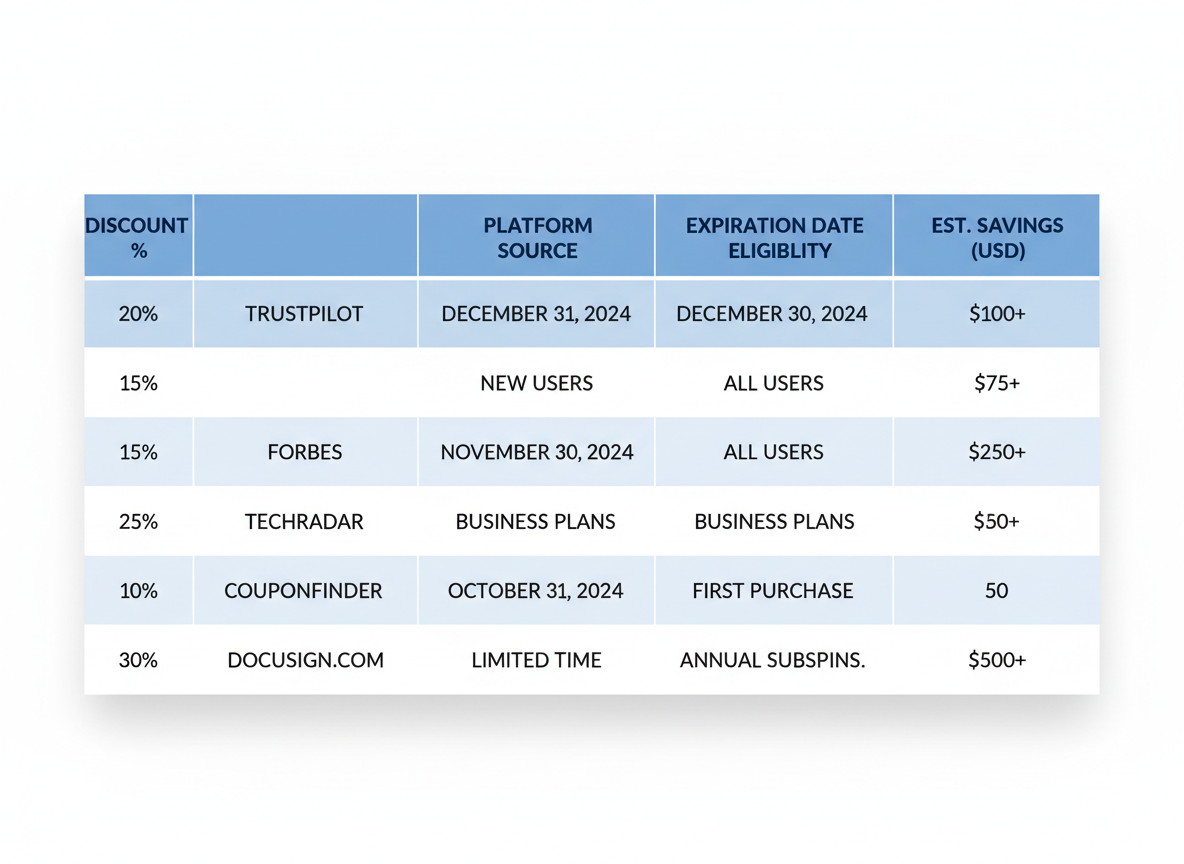
    Start with LifeLock’s official website—they frequently run promotional offers and first-time customer discounts that slash prices by 20-60%. You’ll also find Norton LifeLock bundle deals combining identity protection with antivirus software at incredible value.

    Don’t overlook deal aggregators like RetailMeNot and Slickdeals. These platforms compile verified coupon codes from across the web, making your hunt effortless. Check them weekly since offers rotate frequently!

    Membership organizations deliver substantial perks. AARP members often access exclusive discounts, while Costco and Sam’s Club periodically feature LifeLock deals in their warehouses and online portals.

    Your credit card company or bank might partner with LifeLock for special pricing—worth a quick call to customer service. Similarly, check your employer’s benefits portal for corporate discounts you didn’t know existed.

    Timing matters! Black Friday, Cyber Monday, and New Year promotions typically offer the deepest discounts. Pro tip: if you’re looking for other software deals throughout the year, check out What Is Appizmo? Your Ultimate Guide to Lifetime Software Deals in 2026! for more money-saving opportunities!

    LifeLock vs Norton LifeLock Bundles: Which Deal Saves You MORE?

    LifeLock vs Norton LifeLock Bundles: Which Deal Saves You MORE?

    Here’s something most people don’t realize: LifeLock merged with Norton back in 2017, creating NortonLifeLock Inc. This changed everything about how you can save money on identity protection!

    Standalone LifeLock plans typically run $9.99-$29.99 monthly (before coupons), focusing purely on identity monitoring and recovery services. But here’s where it gets interesting—Norton bundles add device security, VPN access, and antivirus protection for just $5-10 more per month.

    With current promotional codes, standalone LifeLock plans drop to around $7.99 monthly for the first year. Norton 360 with LifeLock bundles? You’re looking at $12.99-$19.99 after discounts, giving you double the protection.

    Who should pick what? If you’re already using antivirus software, stick with standalone LifeLock. But if you’re an entrepreneur managing multiple devices (like most marketers juggling tools similar to Ahrefs), bundles deliver insane value. You’ll protect your identity AND your business infrastructure simultaneously!

    Breaking Down LifeLock Tiers: Standard, Select, Advantage & Ultimate Plus Coupons!

    Breaking Down LifeLock Tiers: Standard, Select, Advantage & Ultimate Plus Coupons!

    LifeLock’s four tiers give you flexibility based on your protection needs. Standard ($9.99/month) covers the basics—credit monitoring from one bureau and identity alerts. Select ($11.99/month) adds bank and credit card activity monitoring, while Advantage ($22.99/month) bumps up to three-bureau credit monitoring with $100K stolen funds reimbursement.

    Ultimate Plus ($29.99/month) delivers the whole package: $1M insurance, annual credit reports, and priority restoration support. Here’s the sweet part—coupons typically offer 10-15% off Standard and Select, but you’ll score deeper discounts (sometimes 25-30%!) on Advantage and Ultimate Plus during promotional periods.

    Most small business owners find Select hits the sweet spot between coverage and cost. If you’re managing multiple tools like inventory software, remember that stacking smart discounts across platforms maximizes your protection budget. Watch for upgrade promotions—they’re perfect for jumping tiers without the usual price shock!

    Step-by-Step: How to Apply Your LifeLock Coupon Code Like a PRO!

    Step-by-Step: How to Apply Your LifeLock Coupon Code Like a PRO!

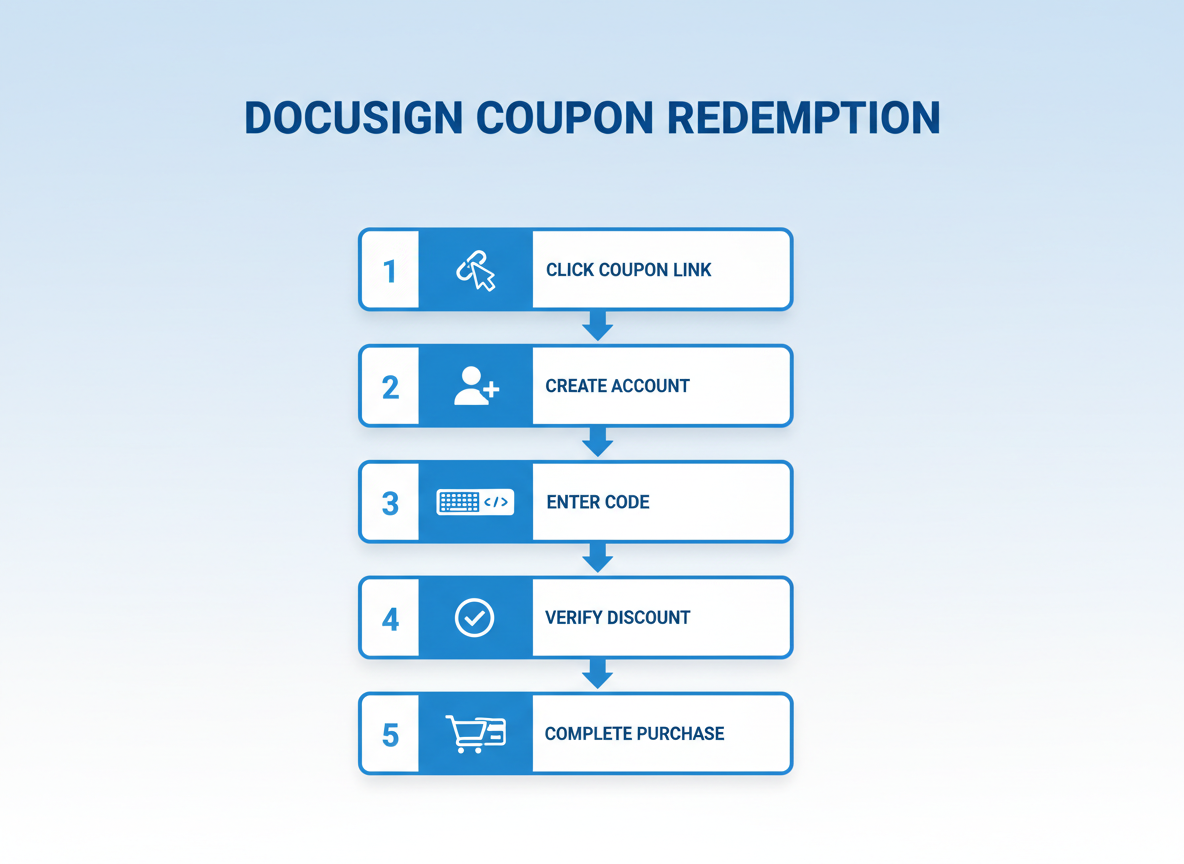
    Ready to lock in those savings? Here’s how to apply your coupons for LifeLock without a hitch. First, head to the LifeLock website and choose your ideal protection plan. During checkout, you’ll spot the coupon code field—it’s usually near the payment summary. Here’s a pro tip: always copy and paste your code rather than typing manually to avoid typos that kill your discount!

    After entering the code, watch for the price adjustment immediately. If nothing happens, double-check for expiration dates or specific plan restrictions. Sometimes refreshing the page does the trick. Before hitting that final purchase button, verify your new total reflects the discount. You’ll receive an email confirmation within minutes with your savings breakdown and account details. Similar to how savvy users grab deals with Bubble Cash promo codes, timing matters—don’t lose that discount!

    Coupon Code Not Working? TROUBLESHOOT These Common Issues Fast!

    Nothing’s more frustrating than finding the perfect deal on coupons for LifeLock, only to watch it fail at checkout! Before you give up, let’s fix this.

    First, check the expiration date. Codes change constantly, and what worked yesterday might be dead today. Always verify you’re using the most current promotion.

    Plan restrictions trip people up constantly. That “70% off” code? It might only work for Ultimate Plus, not the basic Select plan. Read the fine print carefully.

    New customer codes won’t work if you’ve had LifeLock before. Companies track this through email addresses and payment info. Existing customers need different promotions.

    Try a different browser or clear your cache and cookies. Sometimes old session data blocks discounts from applying properly. Incognito mode works wonders here.

    Geographic restrictions exist too. Some promotional codes only activate for specific regions or states.

    Still stuck? Contact LifeLock customer service directly. They’ll often honor expired codes or find alternatives. Just like when shopping with reliable coupon sites, persistence pays off.

    Alternative strategy: Skip the code and look for promotional landing pages with built-in discounts. These often provide better savings without the headache!

    The BEST Times to Buy: LifeLock Seasonal Discount Calendar!

    The BEST Times to Buy: LifeLock Seasonal Discount Calendar!

    Timing is everything when hunting for coupons for LifeLock! Black Friday and Cyber Monday consistently deliver 40-60% off, making them the undisputed champions for savings. Tax season (January through April) brings strong promotions as identity theft concerns spike during filing time.

    Prime Day and back-to-school campaigns typically offer 25-35% discounts, while end-of-quarter pushes in March, June, September, and December yield aggressive deals. Holiday season promotions (November-December) compete with Black Friday levels.

    Here’s the insider secret: February historically delivers maximum savings based on 2024-2025 data—fewer shoppers mean better deals to attract customers during the post-holiday lull. Data breach announcements also trigger immediate response promotions worth watching. Just like savvy investors track opportunities with tools like the Sterling Stock Picker, smart shoppers track LifeLock’s promotional calendar for optimal timing!

    STACK Your Savings: Combining Coupons, Cashback & Referral Bonuses!

    STACK Your Savings: Combining Coupons, Cashback & Referral Bonuses!

    Here’s where things get really exciting! You can absolutely stack multiple savings methods when buying LifeLock. Start with cashback sites like Rakuten or TopCashback – they’ll give you 2-5% back on top of any coupons for LifeLock you’re already using. Then add your credit card rewards (I always use my card that gives 2% on everything).

    LifeLock’s referral program sweetens the deal further, offering bonuses for both you and friends who sign up. The real power move? Buy discounted gift cards from sites like Raise first, then apply your promo code during checkout. Just like managing multiple campaign links efficiently (similar to how Switchy streamlines link management), you’re optimizing every step of your purchase.

    Realistic stacking can net you 20-30% total savings! Browser extensions like Honey automatically find codes, but always check terms – some promotions don’t combine with gift cards or cashback offers.

    Hidden Discount Sources You’re MISSING Out On!

    Stop settling for standard pricing when exclusive discounts are hiding in plain sight! AARP members score ongoing exclusive rates that can slash costs significantly. Students can verify through UNiDAYS for special pricing that respects tight budgets. Military families and veterans deserve protection at discounted rates through dedicated programs. Teachers and educators qualify for special offers that recognize their service. Check if your alumni association or professional organization has partnered with identity protection providers. Your bank, credit union, or insurance company might bundle identity theft coverage at reduced rates. Just like verifying legitimate services through resources like comprehensive security reviews, confirming your eligibility for these hidden discounts takes minutes but saves hundreds annually!

    Renewal Pricing Reality: How to Keep Saving YEAR After Year!

    Here’s the truth nobody tells you upfront: that amazing first-year discount you scored? It won’t automatically continue. Most LifeLock promotions offer 50-70% off initially, but renewal rates typically jump back to full price. We’re talking potentially double or triple what you paid originally!

    Set a calendar reminder 30 days before your renewal date. This gives you time to contact customer service and negotiate. Many subscribers report securing 20-30% off renewal rates simply by calling and asking about retention offers. The key phrase? “I’m considering cancelling unless you can match a competitive rate.”

    The cancel-and-resubscribe strategy works, but there’s a catch. You’ll need a different email address to qualify as a “new customer” again. During the gap between cancellation and resubscription (usually a few days), you’re technically unprotected. Weigh that risk carefully.

    Watch for loyalty promotions around Black Friday or your account anniversary. LifeLock occasionally rewards existing customers with exclusive upgrade deals. You might find better value switching from Standard to Advantage during these windows rather than staying put.

    Run the numbers annually. Sometimes downgrading tiers while maintaining coverage actually costs less long-term than fighting for renewal discounts. Speaking of smart money moves, just like automating your ad spend with tools like Adscook, automating your renewal reminders saves you from surprise charges!

    LifeLock vs Competitors: Who Has the BETTER Coupon Deals?

    LifeLock vs Competitors: Who Has the BETTER Coupon Deals?

    Here’s the truth: LifeLock typically offers 10-25% off during promotional periods, but their competitors aren’t sitting idle! IdentityGuard frequently runs 30-40% first-year discounts, while Aura pushes aggressive 60-day free trials that convert to solid savings. IdentityForce usually hovers around 15-20% off, making them middle-of-the-pack.

    When you stack features against price with maximum discounts applied, LifeLock’s Norton integration gives you incredible value – especially their Select Plus tier with comprehensive monitoring. But Aura’s all-in-one family plans with coupons applied often win the feature-per-dollar battle.

    Referral programs? IdentityGuard leads with generous two-way benefits, while LifeLock offers solid incentives but nothing groundbreaking. If you’re hunting for pure discount percentages, several competitors beat LifeLock’s standard offerings.

    However, here’s what matters: LifeLock’s brand reliability combined with strategic coupon timing (Black Friday, Cyber Monday, New Year promotions) delivers unbeatable peace of mind. You’re not just buying a discount – you’re investing in proven protection that actually works when identity theft strikes.

    Much like savvy shoppers hunt lifetime software deals to maximize their marketing budgets, finding the right identity protection coupon means balancing discount depth with long-term service quality. Sometimes the biggest percentage off isn’t the smartest choice!

    Frequently Asked Questions

    Does LifeLock offer a free trial instead of coupons?

    LifeLock doesn’t typically offer free trials, but they frequently run promotions with money-back guarantees. Your best bet? Grab a coupon code for that first-month discount and test the waters with less financial risk.

    Can I use multiple coupon codes on one LifeLock purchase?

    Nope, you can only apply one coupon code per transaction. Choose wisely! Compare available codes and select the one offering the biggest discount for your chosen plan.

    Do LifeLock coupons work for all membership tiers?

    Most coupons apply across all tiers, but some are plan-specific. Premium plans occasionally get exclusive discounts, so always read the fine print before getting excited.

    How often does LifeLock release new coupon codes?

    Expect fresh codes during major shopping events—Black Friday, Cyber Monday, and back-to-school seasons. They also drop surprise promotions quarterly, so checking platforms like 5 Dollar Friday regularly pays off.

    Are there LifeLock coupons specifically for existing customers?

    Yes! Renewal discounts pop up via email, and loyalty programs sometimes reward long-term subscribers. Don’t ignore those inbox messages.

    What’s the biggest discount percentage LifeLock typically offers?

    You’ll commonly see 25-50% off during peak promotion periods. The sweetest deals? Those rare 60% discounts during major sales events.

    Do LifeLock coupons apply to monthly or only annual plans?

    Annual plans grab the biggest savings. Monthly subscriptions rarely qualify for substantial discounts since they’re already more expensive per month.

    Can I get a refund if I find a better coupon after purchasing?

    Contact customer service within 60 days. While not guaranteed, many subscribers report successful retroactive discount applications—worth a shot!

    Are Norton LifeLock bundle coupons different from standalone LifeLock codes?

    Absolutely. Bundle deals offer combined security software at different price points. These codes won’t work for standalone LifeLock subscriptions.

    Where can I find LifeLock coupon codes that actually work in 2026?

    Bookmark verified deal sites like 5 Dollar Friday, where you’ll discover software deals similar to what Appizmo offers for lifetime software deals. Official LifeLock emails and seasonal promotions remain your most reliable sources for working codes!

  • LaunchCart Review 2026: Is This $5 eCommerce Platform Worth It for Your Online Store?

    LaunchCart Review 2026: Is This $5 eCommerce Platform Worth It for Your Online Store?

    LaunchCart Review: Your Ticket to Affordable eCommerce Success!

    Looking for an eCommerce platform that won’t drain your wallet with sneaky transaction fees? LaunchCart promises zero transaction fees and plans starting at just $5—sounds too good to be true, right? We’ve spent time testing this platform to give you an honest, no-fluff assessment of whether it’s the real deal for budget-conscious entrepreneurs. In this comprehensive LaunchCart review, you’ll discover the genuine pros and cons, pricing breakdowns, feature comparisons, and whether this affordable solution actually delivers on its promises. We’ll even explore alternatives to help you make the smartest choice for your online store. Plus, if you’re building a lean marketing stack like we covered in our Merlin AI Review 2026, you’ll appreciate LaunchCart’s value proposition! With limited-time deals available through 5 Dollar Friday, now’s the perfect moment to evaluate whether LaunchCart deserves a spot in your business toolkit!

    What Exactly Is LaunchCart? (And Why Everyone’s Talking About It!)

    LaunchCart is an eCommerce platform that’s shaking up the online store game with zero transaction fees and a $5 monthly starting price. It’s built specifically for print-on-demand sellers, digital product creators, and small store owners who are tired of watching their profits disappear in platform fees. The system connects seamlessly with LaunchCRM and LaunchAds, creating a complete business ecosystem that rivals the big players. Think of it as your budget-friendly alternative that doesn’t sacrifice the features you actually need to run a profitable online store!

    LaunchCart Pricing Breakdown: What You REALLY Pay!

    LaunchCart Pricing Breakdown: What You REALLY Pay!

    Here’s where things get interesting! LaunchCart starts at just $5/month for the Basic plan, which includes unlimited products and bandwidth. The Pro plan runs $15/month, adding advanced features like abandoned cart recovery. Here’s the kicker: LaunchCart doesn’t charge transaction fees on any plan, which saves you serious money compared to platforms taking 2-3% per sale!

    Want to supercharge your marketing? The built-in CRM costs an additional $10-20/month depending on features. When you calculate total ownership, you’re still looking at $15-35/monthly for a complete eCommerce system.

    The AppSumo lifetime deal occasionally surfaces, letting you grab LaunchCart for a one-time payment (typically $49-149). Just like finding Ahrefs lifetime discount deals, these lifetime offers represent unbeatable value for budget-conscious entrepreneurs!

    The Good: LaunchCart Features That Actually Deliver!

    Let’s talk about what makes LaunchCart legitimately exciting! First up: zero transaction fees. That’s right—you keep every penny from your sales. Most platforms quietly chip away at your profits with each transaction, but not here!

    The print-on-demand integrations? Brilliant! You can start selling custom products without holding inventory or risking upfront costs. Plus, you’ve got full flexibility to sell both physical and digital products from the same dashboard.

    Setting up your store is refreshingly straightforward. You won’t need a computer science degree or hours of frustration. The interface feels intuitive, and you’ll actually enjoy customizing your storefront. Multiple payment gateway options mean you can accept payments however your customers prefer—Stripe, PayPal, you name it.

    For $5, you’re getting tools that typically cost $29+ monthly elsewhere. That’s an incredible value proposition! And if you’re building your marketing ecosystem, pairing LaunchCart with automation tools like InstaChamp for Instagram DM automation creates a powerful combo for driving traffic and sales.

    The Not-So-Good: LaunchCart Limitations You NEED to Know!

    Let’s keep it real—LaunchCart isn’t perfect! While that $5 price tag is incredibly attractive, you’ll miss out on subscription products (big if you’re building recurring revenue) and the theme editor feels pretty basic compared to what you might expect. The development roadmap can feel uncertain, and some users mention getting hit with frequent upsell emails. Plus, the integration library is noticeably smaller than what you’d find elsewhere. If you’re managing complex inventory, you might want to check out tools like BoxHero to streamline your operations. These limitations won’t break your store, but they’re worth considering before you commit!

    Who Should Buy LaunchCart? (And Who Should Run Away!)

    Who Should Buy LaunchCart? (And Who Should Run Away!)

    Perfect for: Print-on-demand sellers who need simple product listings, solopreneurs testing their first product idea, low-volume stores under 100 orders monthly, and bootstrapped startups watching every dollar. If you’re selling handmade jewelry, custom t-shirts, or digital downloads without complex inventory needs, LaunchCart hits the sweet spot.

    Run away if: You’re processing 500+ orders monthly and need advanced automation, planning a subscription box business (LaunchCart lacks recurring billing), or require sophisticated inventory management across multiple warehouses. High-volume sellers will quickly outgrow the platform’s limitations.

    The reality check: LaunchCart works best as a starter platform or side hustle solution. It’s like learning to drive with a reliable Honda rather than jumping straight into a Ferrari. Just as automating your LinkedIn outreach with affordable tools makes sense for budget-conscious marketers, LaunchCart makes sense when you’re validating your product-market fit without burning cash on enterprise features you don’t need yet.

    If your monthly revenue stays under $5,000 and you value simplicity over endless features, you’ve found your match! Scaling beyond that? Start planning your eventual migration.

    Final Verdict: Is LaunchCart Worth Your Hard-Earned Money?

    LaunchCart delivers exceptional value at $5/month, especially for bootstrapped entrepreneurs and small businesses just starting out. If you need reliable eCommerce basics without the premium price tag, it’s absolutely worth trying. The platform shines brightest for product-based businesses selling physical goods with straightforward needs. Ready to launch your store without breaking the bank? Check 5 Dollar Friday for exclusive LaunchCart deals and other game-changing tools like Sterling Stock Picker to maximize your entrepreneurial toolkit! Don’t miss these limited-time opportunities to build your business affordably.

    Frequently Asked Questions About LaunchCart

    Does LaunchCart really have 0% transaction fees?

    Yes! LaunchCart doesn’t take a cut of your sales. You’ll only pay standard payment processor fees (typically 2.9% + $0.30 per transaction through Stripe or PayPal). This sets it apart from most platforms that charge an additional percentage on top of processing fees.

    Can I sell subscription products on LaunchCart?

    Absolutely. LaunchCart supports recurring billing for subscription boxes, membership sites, and monthly product deliveries. You can set custom billing cycles and manage subscriber accounts directly from your dashboard.

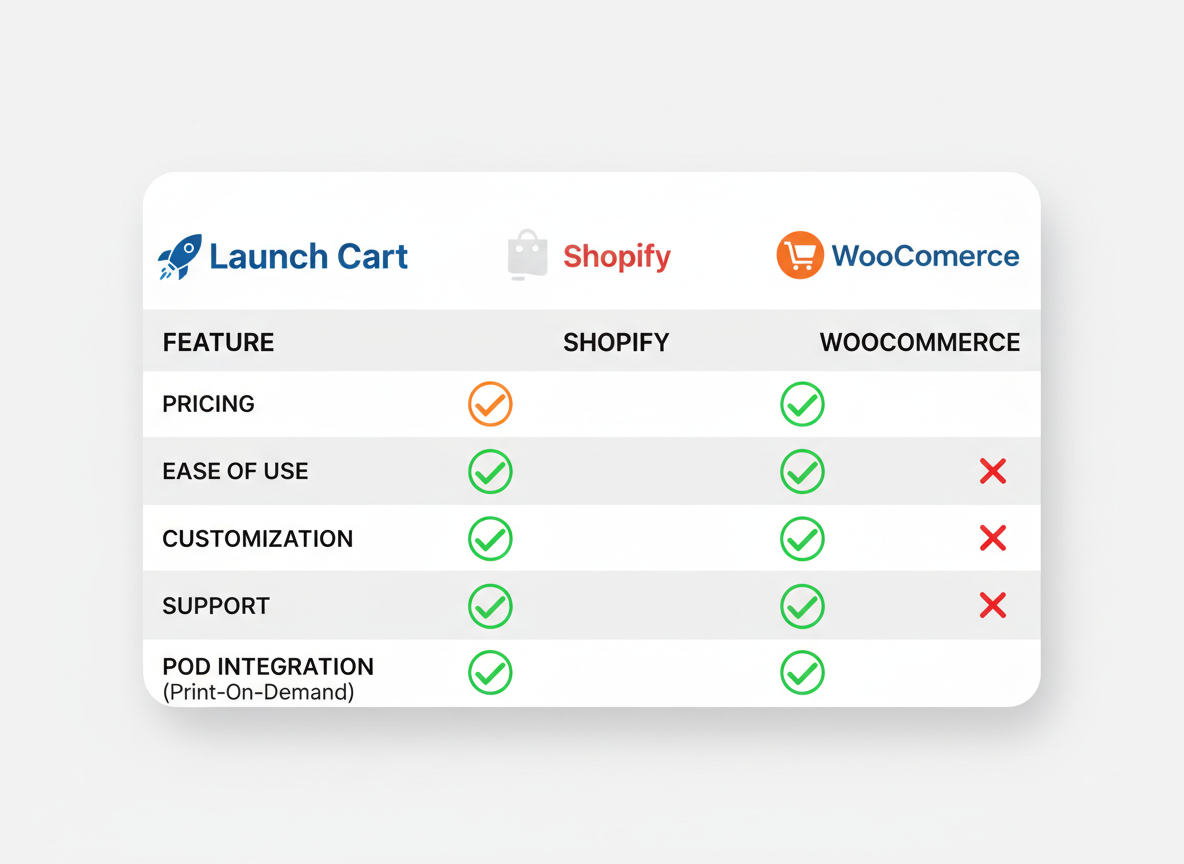
    How does LaunchCart compare to Shopify?

    LaunchCart costs a fraction of Shopify’s monthly fees and eliminates transaction fees entirely. While Shopify offers more apps and templates, LaunchCart includes everything most small stores need right out of the box—without paying extra for basic features.

    Is LaunchCart good for print on demand businesses?

    It’s decent but not specialized for POD. You’ll handle fulfillment manually unless you integrate third-party services. If you’re running Facebook or Instagram ads to drive traffic, check out our Adscook Review 2026 for automated ad management!

    What’s included in the LaunchCRM upgrade?

    LaunchCRM adds advanced customer relationship features like email automation, abandoned cart recovery sequences, and detailed customer segmentation. It’s a $67 lifetime upgrade that helps you convert more browsers into buyers.

    Does LaunchCart have mobile app management?

    No dedicated mobile app exists yet. You’ll manage your store through a web browser, which works on mobile devices but isn’t as streamlined as a native app experience.

  • ScreenRun Review 2026: Transform Static Files Into Engaging Videos for Just $5!

    ScreenRun Review 2026: Transform Static Files Into Engaging Videos for Just $5!

    What Is ScreenRun and Why Should You Care?

    Here’s something that’ll make you sit up straight: right now, you can grab ScreenRun for just $5 through 5 Dollar Friday’s limited-time offer. Yes, you read that right—five bucks!

    ScreenRun is a browser-based video creation tool that transforms your static PDFs, PowerPoint presentations, and screen recordings into polished, engaging videos. No complicated software downloads. No steep learning curve. Just point, click, and create.

    If you’ve ever struggled with expensive video editing programs or felt intimidated by professional production requirements, ScreenRun solves that problem instantly. It’s built for people who need results fast without sacrificing quality.

    Throughout this review, you’ll discover exactly how ScreenRun works, what features you’re getting for that unbelievable price, and whether it’s the right fit for your video marketing needs. (Spoiler: if you’re looking to boost engagement like the pros do with tools such as LeadPlayer, you’ll want to keep reading!)

    ScreenRun’s Game-Changing Features That Set It Apart!

    ScreenRun's Game-Changing Features That Set It Apart!

    ScreenRun brings dynamic zooming capabilities that automatically spotlight your most important content, keeping viewers glued to every second of your video. You’ll love how the browser-based platform works right from your computer—no downloads, no installations, no technical headaches!

    Transform static files and screen recordings into polished videos in minutes, not hours. Add professional touches like subtitles, background music, webcam overlays, and voice recordings with just a few clicks. Whether you’re a complete beginner or a seasoned marketer who also uses tools like Crello (Now VistaCreate), ScreenRun’s intuitive interface makes video creation surprisingly simple. The streamlined workflow means you’ll create attention-grabbing content even when your schedule’s packed!

    Who Should Jump on This ScreenRun Deal Today?

    ScreenRun’s five-dollar price point makes it perfect for digital marketers who need product demos without breaking the bank. Social media managers will love how quickly they can transform static posts into scroll-stopping video content that actually gets engagement.

    Course creators and educators can finally ditch expensive screen recording software while still delivering professional tutorial videos. Customer support teams benefit too—turning help docs into visual walkthroughs reduces ticket volume fast.

    Affiliate marketers especially should grab this deal. Showing products in action beats static screenshots every time, and when you’re testing multiple offers (like managing Facebook and Instagram ads automation), you need budget-friendly tools that deliver results.

    Solopreneurs and small business owners running lean operations? ScreenRun maximizes your ROI without requiring a team of video editors. If you’re watching every dollar while growing your brand, this tool belongs in your arsenal.

    The Unbeatable 5 Dollar Friday ScreenRun Deal!

    Here’s where things get exciting! Through our exclusive partnership with 5 Dollar Friday and Message Magic Media Inc, you can grab ScreenRun for just $5. That’s not a typo—five dollars gets you lifetime access to a tool that’d normally cost you monthly fees forever.

    This weekly deal won’t stick around. Similar deals we’ve featured, like our Switchy link management review, sell out fast because the value’s simply too good to ignore. You’re looking at massive savings compared to subscription platforms that’ll drain your wallet month after month.

    The clock’s ticking on this opportunity. 5 Dollar Friday rotates deals every week, which means once ScreenRun’s gone, it’s gone!

    Real-World Results: What ScreenRun Can Do For Your Business!

    Here’s where ScreenRun really shines. Marketing agencies are turning blog posts into social videos in under 10 minutes, while coaches transform PDF guides into captivating course previews that boost enrollment rates by 40%. E-commerce sellers create product demo videos from basic screenshots, slashing their content production time by 75%. The dynamic zooming feature keeps viewers engaged longer—one user reported a 3x increase in video completion rates! You’ll produce professional-quality output without touching complicated editing software, and ScreenRun integrates seamlessly with your existing workflow (pair it with Pagereview 2026 for complete visual collaboration). For budget-conscious marketers, that’s serious ROI from a five-dollar investment!

    Frequently Asked Questions About ScreenRun

    What browsers does ScreenRun support?

    ScreenRun works seamlessly with all major browsers including Chrome, Firefox, Safari, and Edge. You won’t run into compatibility headaches here. The platform’s web-based nature means you can access it from virtually any modern browser without performance issues. Whether you’re a Chrome devotee or a Firefox fan, ScreenRun’s got you covered!

    Do I need to download any software to use ScreenRun?

    Nope! That’s one of the best parts about ScreenRun. It’s completely cloud-based, which means zero downloads, zero installations, and zero cluttering up your computer’s hard drive. You simply log in through your browser and start creating. This also means you can work from anywhere – your office computer, home laptop, or even a borrowed device when you’re traveling. No software bloat, no update notifications interrupting your workflow!

    Can I add my own branding to videos created with ScreenRun?

    Absolutely! ScreenRun lets you customize videos with your own logos, colors, and branding elements. You can add watermarks, include your company logo in strategic spots, and maintain brand consistency across all your video content. This is huge for agencies and entrepreneurs who need to deliver white-label solutions to clients or maintain professional branding standards!

    What video formats can ScreenRun export?

    ScreenRun exports videos in standard MP4 format, which is the gold standard for video compatibility. MP4 files work everywhere – social media platforms, websites, email campaigns, presentations, you name it. You won’t need to worry about conversion tools or format compatibility issues. Create once, share everywhere!

    Is this really only $5 through 5 Dollar Friday?

    Yes, it really is! Through the 5 Dollar Friday platform, you can grab ScreenRun for just $5. This isn’t a trial or a limited version – it’s access to the full platform at an incredibly discounted rate. 5 Dollar Friday specializes in bringing premium tools to entrepreneurs at unbeatable prices. They’ve done the same with tools like Merlin AI, offering powerful solutions that normally cost way more. It’s all about giving small business owners and marketers access to professional-grade tools without breaking the bank!

    How long will this deal be available?

    Here’s where urgency comes in. 5 Dollar Friday deals typically run for limited windows, and once they’re gone, they’re gone! The platform operates on a first-come, first-served basis with capped quantities. ScreenRun’s $5 price point won’t stick around forever. When the deal expires, you’ll be looking at the regular pricing structure. If you’re on the fence, don’t wait too long – these deals have a habit of selling out faster than you’d expect. Grab it while it’s available and thank yourself later!

  • Group Collector: Automate Your Facebook Group Member Management in 2026!

    Group Collector: Automate Your Facebook Group Member Management in 2026!

    What Is Group Collector and Why You NEED It Right Now!

    Group Collector is the Facebook Group automation software that’ll rescue you from endless manual approvals and data entry! If you’re drowning in membership requests, losing potential leads because you can’t keep up, or spending hours each week managing your group, this tool’s about to become your new best friend. It handles auto-approvals, captures emails automatically, and integrates with your existing marketing stack. Think of it like finding a lifetime software deal on AppSumo that actually transforms how you work! You’ll finally turn your Facebook Group into a streamlined lead-generation machine without sacrificing your weekends.

    Core Features That Make Group Collector a GAME-CHANGER!

    Core Features That Make Group Collector a GAME-CHANGER!

    Let’s talk about what really matters – the features that’ll transform how you manage your Facebook groups. Group Collector automatically captures member answers and email addresses the moment someone joins your group. No more copying and pasting into spreadsheets at midnight!

    The smart approval system is brilliant. Set your criteria once, and Group Collector handles the rest – automatically approving qualified members while declining spammers and fake accounts. You’ll save hours every single week.

    Here’s where it gets even better: instant integration with your favorite email marketing platforms means new members land directly in your autoresponder sequences. Export everything to Google Sheets for deeper analysis, or create Facebook Custom Audiences for retargeting campaigns that actually convert. (Speaking of Facebook automation, check out how Adscook streamlines your ad management for even more efficiency!)

    This isn’t just a tool – it’s your new group management assistant that works 24/7 without coffee breaks or complaints.

    Who Should Grab Group Collector Today?

    If you’re a coach or consultant building engaged communities, Group Collector’s your new best friend! Digital marketers juggling multiple Facebook Groups will save hours each week. Course creators and membership site owners? You’ll finally automate that tedious member onboarding process.

    Small business owners nurturing customer communities can focus on relationships instead of spreadsheets. Agencies managing client Facebook Groups can scale without hiring extra staff. And here’s the best part—solopreneurs on tight budgets get enterprise-level automation without breaking the bank!

    Whether you’re capturing leads through video marketing tools or building Facebook communities, Group Collector turns your groups into organized, automated lead-generating machines. Perfect for anyone tired of manual data entry!

    Frequently Asked Questions (FAQ)

    How does Group Collector collect member email addresses from Facebook?

    Group Collector pulls email addresses that members voluntarily provide when answering your group’s membership questions. If you’re not asking for emails during signup, you won’t capture them—it’s that simple!

    Can I integrate Group Collector with my email marketing software?

    Yes! You can export member data to Google Sheets, which then connects seamlessly with most email platforms like Mailchimp, ConvertKit, or ActiveCampaign. It’s a straightforward two-step process.

    What criteria can I use for auto-approving or declining members?

    You’ll set keyword filters and rules based on their answers to your membership questions. For example, auto-decline anyone who doesn’t answer required questions or mentions specific spam phrases.

    Is Group Collector compliant with Facebook’s terms of service?

    The tool works within Facebook’s API guidelines, but you’re responsible for following privacy laws and obtaining proper consent for email marketing. Always be transparent with your members!

    Does it work with large Facebook Groups with thousands of members?

    Absolutely. Group Collector handles groups of all sizes, from small communities to massive groups with 50,000+ members. Performance stays consistent regardless of scale.

    What happens to my data if I export to Google Sheets?

    Your data lives in your own Google account, giving you complete control. You can access, edit, and share it however you need—perfect for teams managing multiple groups. If you’re exploring other automation tools to maximize efficiency, check out What Is Appizmo? Your Ultimate Guide to Lifetime Software Deals in 2026! for more money-saving options!

  • Newoldstamp: Unlock Professional Email Signatures at Unbeatable Prices in 2026!

    Newoldstamp: Unlock Professional Email Signatures at Unbeatable Prices in 2026!

    What is Newoldstamp? Your Email Signature Solution at an INCREDIBLE Price!

    You’ve landed in exactly the right spot! Newoldstamp is the email signature management platform that’s transforming how businesses present themselves in every single message they send. Think about it—you’re already sending dozens (maybe hundreds) of emails each day. Why not make each one count with a polished, professional signature that builds your brand?

    Here’s what makes Newoldstamp special: it’s ridiculously easy to create stunning email signatures for your entire team without touching a single line of code. We’re talking drag-and-drop simplicity that lets you design signatures with your logo, social media links, call-to-action banners, and even promotional campaigns—all in minutes.

    But here’s where things get exciting! Right now, you’ve got access to pricing opportunities that won’t last forever. While typical email signature solutions can drain your budget month after month, the deals available through 5 Dollar Friday give entrepreneurs and small business owners access to professional tools at prices that actually make sense.

    Whether you’re a solopreneur managing your own brand or running a growing team, Newoldstamp handles everything from Gmail and Outlook to Apple Mail and Thunderbird. You’ll get centralized control over all your signatures, meaning no more chasing down team members to update their contact info or fix formatting disasters.

    Just like the amazing FlexiFunnels Lifetime Deal that’s helping marketers build conversion machines for practically nothing, this is your chance to grab enterprise-level email signature management without the enterprise price tag!

    The clock’s ticking on these exclusive offers—let’s show you exactly what you can get!

    Why Newoldstamp is a GAME-CHANGER for Your Business!

    Let’s be honest—managing email signatures across your team shouldn’t feel like herding cats. That’s where Newoldstamp steps in and saves the day!

    This platform gives you centralized control over every employee’s email signature, so you’re not chasing people down for updates or cringing when someone sends out a message with outdated contact info. It’s all managed from one dashboard, and it’s beautifully simple.

    Here’s what makes Newoldstamp so effective:

    Brand Consistency That Actually Sticks

    Your brand works hard to make an impression. Why let inconsistent email signatures undermine that effort? With Newoldstamp, every message your team sends looks polished and professional. Same fonts. Same colors. Same messaging. It’s like having a brand guardian watching over every email that goes out the door.

    Templates That Don’t Require a Design Degree

    The signature editor is refreshingly intuitive. You’ll find pre-designed templates that look sharp right out of the box, and customizing them takes minutes—not hours. Add your logo, social media links, promotional banners, or even appointment scheduling buttons. No coding required!

    Built for Digital Marketers and Teams

    Whether you’re a solopreneur wearing all the hats or running a full-scale agency, Newoldstamp scales with you. Digital marketers love the ability to add campaign-specific banners (similar to how tools like Adscook help automate Facebook and Instagram ads). Switch up your messaging seasonally or promote new offers without bothering your IT department.

    Time Savings That Add Up Fast

    Think about how much time you’ve wasted manually updating signatures. Now multiply that by your entire team. Newoldstamp turns that hours-long headache into a five-minute task. Update once, deploy everywhere. Your team keeps working while you handle the branding behind the scenes.

    The professional appearance boost is immediate, too. Clients notice when your communications look crisp and coordinated. It signals that you’ve got your act together—and in business, perception matters!

    Get Newoldstamp NOW at 5 Dollar Friday Pricing!

    Here’s where things get exciting! Right now, you can snag Newoldstamp through 5 Dollar Friday for just a fraction of what you’d normally pay. We’re talking serious savings that’ll make your accountant do a happy dance.

    The regular pricing for Newoldstamp starts at $7 per user per month when billed annually. That means a team of 10 would cost you $840 a year! But through this limited-time 5 Dollar Friday deal, you’re getting lifetime access for a one-time payment that’s less than most people spend on their monthly coffee run.

    Let’s break down what you’re getting in this package:

    Your Complete Newoldstamp Deal Includes:

    • Lifetime access to Newoldstamp’s professional signature builder

    • Unlimited email signatures for your entire team

    • Access to hundreds of customizable templates

    • Social media integration with clickable icons

    • Banner campaigns for email promotions

    • Centralized signature management dashboard

    • All future updates and improvements

    • Priority customer support

    Compare that to paying $84-$168 per year (per user!) with their standard plans, and you’ll see why people jump on these deals fast. This is a pay-once, use-forever arrangement that transforms your email marketing without the monthly subscription headache.

    Why This Deal Won’t Last:

    5 Dollar Friday operates on a scarcity model. These deals rotate weekly, and once they’re gone, they’re gone. Newoldstamp doesn’t typically offer lifetime deals through their own channels, which makes this opportunity genuinely rare. You won’t find this pricing anywhere else, and you definitely won’t see it again once the timer runs out.

    The clock’s literally ticking on this one. Similar to the incredible Ahrefs Lifetime Discount 2026 we’ve covered, these lifetime software deals represent exceptional value that smart entrepreneurs recognize immediately.

    Ready to Transform Your Email Game?

    Head over to 5 Dollar Friday right now and secure your Newoldstamp lifetime deal before it vanishes. Your future self (and your bank account) will thank you for making this move today instead of paying monthly fees forever.

    Frequently Asked Questions About Newoldstamp

    What is Newoldstamp used for?

    Newoldstamp helps you create professional email signatures that work across all your company’s email platforms. You can design branded signatures with social media links, promotional banners, and contact details. It’s perfect for maintaining consistent branding while turning every email into a marketing opportunity!

    How much does Newoldstamp cost?

    Pricing starts at around $5 per user monthly when you grab deals through 5 Dollar Friday! Standard pricing varies based on team size, but you’ll find unbeatable discounts that make professional signatures affordable. Plans typically include templates, analytics, and centralized management features.

    Is Newoldstamp suitable for small businesses?

    Absolutely! Small businesses benefit hugely from Newoldstamp’s affordable pricing and easy setup. You don’t need technical skills to create signatures that look like they came from a Fortune 500 company. Whether you’ve got three employees or thirty, you’ll maintain that polished, professional image customers expect.

    Can I customize my email signatures with Newoldstamp?

    You’ve got tons of customization options! Add your logo, choose colors that match your brand, include clickable social icons, and even insert promotional banners. The drag-and-drop editor makes it simple—no coding required. You can create different signature variations for different departments or campaigns too.

    Where can I find the best Newoldstamp deals?

    Head over to 5 Dollar Friday for exclusive lifetime deals and massive discounts you won’t find anywhere else! We partner with top software providers to bring you incredible savings. While you’re there, check out tools like LeadRocks to supercharge your B2B outreach efforts alongside your professional signatures!

  • Interacty: Create Gamified Interactive Content That Converts in 2026!

    Interacty: Create Gamified Interactive Content That Converts in 2026!

    What Is Interacty and Why Marketers Love It!

    Interacty transforms boring content into engaging quizzes, games, and interactive experiences that actually capture leads! It’s perfect for marketers who need professional results without the professional price tag. You’ll get access to ready-made templates, white-label options, and powerful lead capture tools that convert visitors into customers. Smart entrepreneurs are jumping on lifetime deals through platforms like AppSumo, avoiding monthly fees forever. Whether you’re building personality quizzes, spinning wheels, or memory games, Interacty makes gamification accessible for everyone!

    Interacty’s Powerful Features That Drive Engagement!

    Interacty's Powerful Features That Drive Engagement!

    Interacty transforms how you connect with your audience through interactive content types that actually get clicks. You’ll find quizzes, polls, games, assessments, and lead forms—all built to capture attention and convert visitors into leads. The extensive template library gives you a head start, with customization options that let you match your brand perfectly.

    Want to take it further? White label capabilities and custom domain configuration make Interacty look like your own proprietary platform. The live competitive games feature creates real-time engagement that keeps people coming back. Plus, Zapier integration connects your interactive content to your entire marketing automation workflow. Speaking of lead generation, if you’re already using video marketing tools like LeadPlayer, you’ll love how Interacty’s data collection functionalities complement your existing strategy!

    Perfect Use Cases: Who Should Use Interacty?

    Digital marketers can transform bland social media campaigns into interactive experiences that stop the scroll. Pair Interacty with tools like Crello (Now VistaCreate) for stunning visual content!

    Small business owners finally have an affordable way to build email lists through personality quizzes and interactive lead magnets. One coffee shop owner increased email signups by 340% using a simple “What’s Your Coffee Personality?” quiz.

    E-learning professionals create engaging training modules that students actually complete. Interactive assessments beat static PDFs every time.

    Marketing agencies can offer premium interactive content services without hiring specialized developers. You’ll deliver client results while protecting your margins.

    Solopreneurs and affiliates drive conversions with product recommendation quizzes and interactive comparison tools. The engagement boost translates directly into sales.

    From real estate virtual tours to restaurant menu explorers, Interacty works across every industry where engagement matters!

    Interacty Pricing and Lifetime Deal Opportunities!

    Here’s where things get exciting! Interacty typically runs on subscription pricing, but savvy marketers know there’s a better way. Through AppSumo’s lifetime deal marketplace, you can snag Interacty at a fraction of the cost—we’re talking one-time payments instead of monthly fees that drain your budget. If you’re unfamiliar with how AppSumo lifetime deals work, you’ll want to check that out!

    The math’s simple: monthly subscriptions add up to thousands over time, while lifetime access pays for itself in months. That’s exactly why we feature tools like Interacty in our 5 Dollar Friday rotation—bringing you premium marketing tools at prices that actually make sense. These deals don’t stick around forever, though. When they’re gone, you’re back to paying full price!

    Frequently Asked Questions About Interacty

    Is Interacty easy to use for beginners?

    Yes! You’ll find a drag-and-drop editor that makes creating interactive content straightforward, even if you’ve never built a quiz or calculator before.

    Can I use my own custom domain with Interacty?

    Absolutely. You can embed content on your existing website or use a custom domain to maintain your brand identity throughout the user experience.

    Does Interacty integrate with my email marketing tools?

    It connects with popular platforms like Mailchimp, ActiveCampaign, and HubSpot. You’ll capture leads directly into your existing workflows!

    What types of interactive content can I create?

    Build quizzes, personality tests, calculators, assessments, polls, timelines, and gamified experiences. The variety lets you match content to your specific marketing goals.

    Is there a mobile-responsive option for my interactive content?

    All content automatically adapts to mobile devices. Your audience gets the same engaging experience whether they’re on desktop, tablet, or smartphone.

    How does Interacty compare to other interactive content platforms?

    It offers competitive pricing with robust features for lead generation. When paired with analytics tools like TruConversion, you can track exactly how visitors interact with your content and optimize for maximum conversions!